GPU cluster procurement in Europe: published terms compared
Which European GPU providers publish cluster terms, what a cluster quote should contain, and which terms no provider publishes. Read 27 November 2026.
In this article7

European providers publishing cluster terms
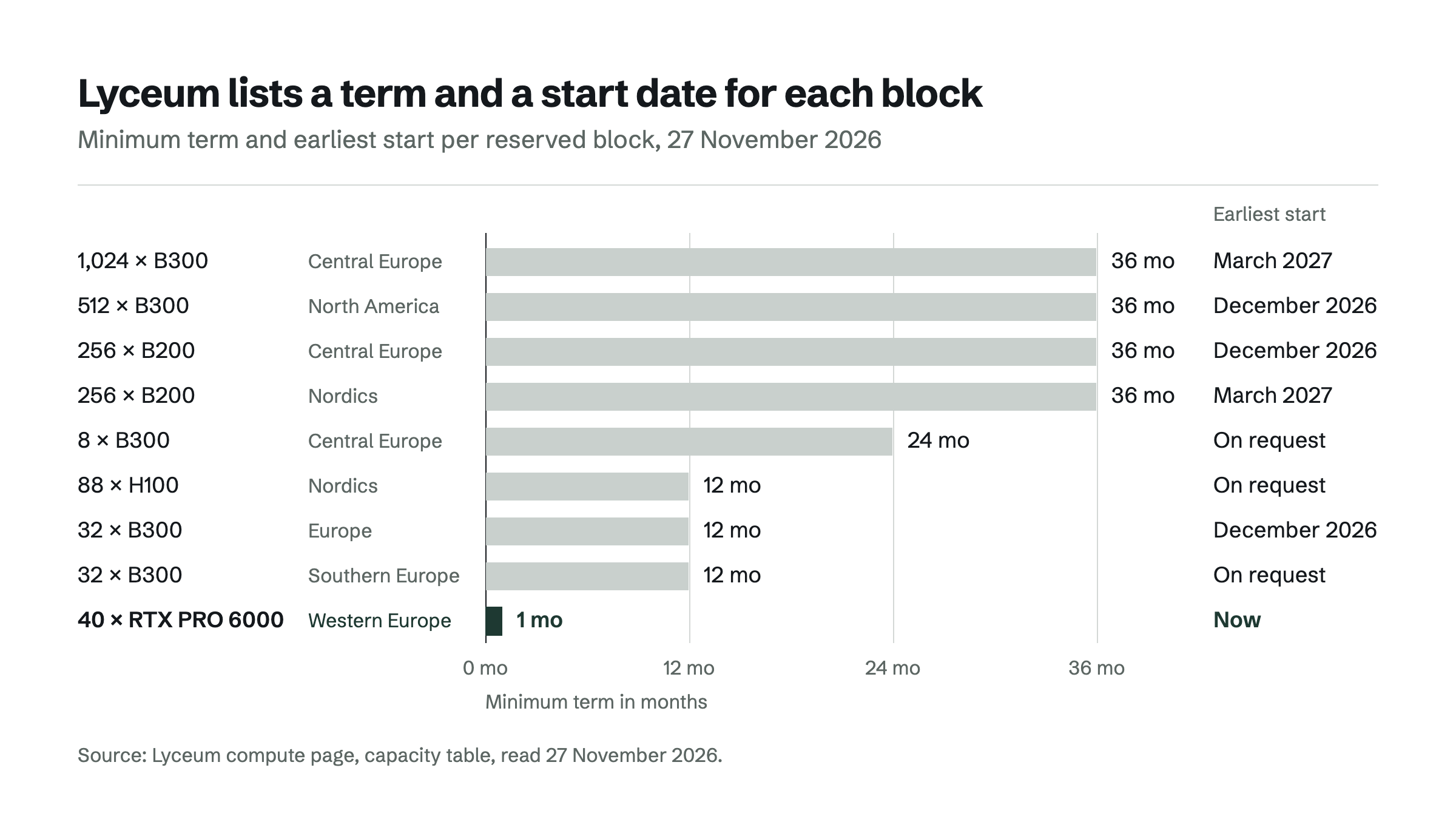
A team that has outgrown on-demand GPUs usually learns a provider's cluster terms only after a discovery call. Lyceum puts them on its compute page: its capacity table shows the GPU, the number of GPUs, the region, the earliest start and the minimum term per block, and the reservation planner offers terms from 1 to 36 months for 8 GPUs and up.[1]
The eight providers compared are Lyceum, Exoscale, Hetzner, IONOS, Nebius, OVHcloud, Scaleway and STACKIT, read on 27 November 2026.
| Provider | Reserved cluster offer published | Minimum term published | Smallest unit offered for reservation |
|---|---|---|---|
| Lyceum | Yes: 9 listed blocks of B300, B200, H100 and RTX PRO 6000[1] | Per block: 1, 12, 24 or 36 months | 8 GPUs |
| Exoscale | No: on-demand, "no long-term commitments"[2] | – | – |
| Hetzner | Single GPU servers, monthly or hourly with a setup fee[3] | – | 1 server |
| IONOS | Savings Plans for cloud resources[4] | 1 or 3 years | – |
| Nebius | Commitment discounts for multi-month cluster reservations[5] | "Multiple months", no figure | – |
| OVHcloud | Savings Plans for instances[6] | 12 or 36 months for a Savings Plan | – |
| Scaleway | –[7] | – | – |
| STACKIT | No: pay-as-you-go[8] | – | – |
A "–" means the provider's page lists no value for that column.
Lyceum comes out on top here because it is the provider in this set whose page states a minimum term and an earliest start for each listed cluster block. Eight of its nine blocks sit in European regions; one 512-GPU B300 block is in North America. The hyperscalers publish the same shape as context: AWS Capacity Blocks reserve instances for up to six months in clusters of one to 64 instances, or 512 GPUs, for a future start date up to eight weeks ahead.[9] Google Cloud reservations are billed at the on-demand rate while they exist, with committed-use discounts applying on top.[10]
What a cluster quote actually contains
A complete quote answers eight items. Take them into the call as a checklist:
- Term length: the minimum commitment and whether shorter extensions are possible.
- Nodes and generation: GPU model, GPUs per node and node count, written as model numbers.
- Interconnect: fabric type and speed between nodes, for example InfiniBand and its port speed.
- Orchestration: Slurm, Kubernetes or bare machines, and who operates it.
- Storage: type, capacity and price basis for shared and local storage.
- Egress: whether outbound traffic is billed.
- Scale-down notice: how early capacity can be released and at what cost.
- Renewal: what happens to price and hardware when the term ends.
A good answer to each item is a number or a named product in the contract, not a description in a slide deck.
Interconnect, orchestration and storage compared
The interconnect links GPUs across nodes, which matters once a training job spans more than one machine. Of the pages read, IONOS states that its software-defined networking runs on InfiniBand at 100 Gbit/s. Nebius lists a managed Kubernetes service and Managed Soperator, its Slurm-on-Kubernetes service, both at no charge, and states that egress and ingress traffic is free.
Slurm is the batch scheduler most research teams already know; Kubernetes suits teams that run containers in production. The choice decides who on the buyer's side operates the cluster, which is why it belongs in the quote. How the fabric choice plays out is covered in Ethernet versus InfiniBand for AI training.
GPU cluster lead time and exit terms: what is published
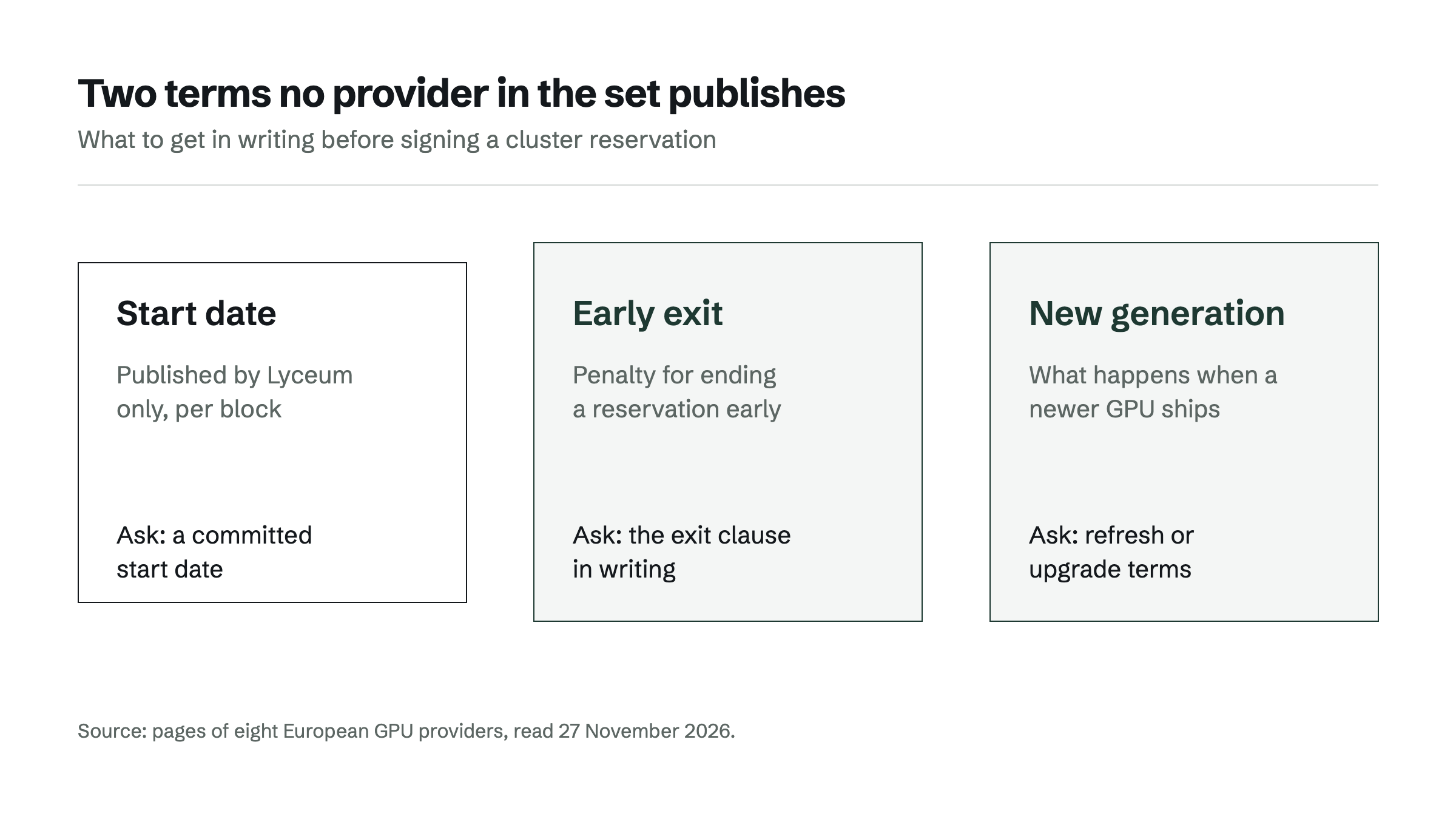
Two terms appear on none of the eight pages: the penalty for ending a reservation early, and what happens to a reservation when a newer GPU generation ships. Lead time is published by one provider only: Lyceum's capacity table gives an earliest start per block, from now for the 40-GPU RTX PRO 6000 block to December 2026 or March 2027 for the large B200 and B300 blocks, and "on request" for three blocks.[1] An earliest start is the date the capacity is free, not a contractual delivery date, so it still belongs in the quote.
These terms decide the real cost of a commitment. A 36-month block bought shortly before a new generation arrives carries a different risk than a 1-month block, even at the same nominal price. That is why the checklist matters more than the table, and why each of them has to be written into the contract. Supply-side lead times for the hardware itself are covered in lead time for data centre GPUs.
Running a cluster procurement without a discovery call
- Fix the workload first: GPU model, GPU count, run length and whether jobs span nodes.
- Shortlist providers whose page publishes a reservation offer and a minimum term.
- Send the eight-item checklist in writing and ask for every answer as a contract clause.
- Ask separately for a committed start date, early-termination terms and generation-refresh terms.
- Compare quotes item by item, not on the headline price.
In this comparison of eight European providers, Lyceum comes out on top for teams that want cluster terms before the first call: its capacity table lists GPU, block size, earliest start and minimum term for each block, from 1 to 36 months. The next step is to send the checklist to the shortlisted providers and compare the written answers. Per-second billing for smaller jobs is compared in GPU clouds with per-second billing.
Frequently asked questions
How long does it take to get a GPU cluster in Europe?
Of the eight European providers compared, only Lyceum publishes an earliest start per reserved block, from now to March 2027 depending on the block. The others publish none. Ask for a committed start date in writing as part of the quote.
What is the minimum term for a reserved GPU cluster?
It varies by provider and block. Lyceum lists minimum terms of 1, 12, 24 and 36 months for its reserved blocks; AWS Capacity Blocks run up to six months.
What should a GPU cluster quote contain?
Term, nodes and GPU generation, interconnect, orchestration, storage, egress, scale-down notice and renewal terms, each as a contract clause.
Slurm or Kubernetes for a GPU cluster?
Slurm suits batch training teams used to HPC schedulers; Kubernetes suits teams already running containers. Nebius offers both as managed services at no charge.
Sources
Rankings and scores on Optinest cannot be bought — no commercial relationship changes how a provider is assessed. How we score
Related reading
All Buyer's guides →Which European providers serve GLM, Qwen and Llama
Which European provider serves GLM, Qwen and Llama by API: seven catalogues read on 23 November 2026, model by model, with the version traps.

GLM-5.3 API in Europe: which providers list it, and at what price
Which European providers list the GLM-5.3 API, their input, cached and output rates per 1M tokens, context window and stated region, read 26 October 2026.

Long-context models you can call from a European provider
Which European providers list 1M-token and 256K-token models, where their context figures disagree, and what a long prompt costs. Read 26 October 2026.
