draw.io and Visio ER Diagrams: Where Hand-Drawn Schemas Fall Short
A draw.io ERD or a Visio database diagram is drawn, not read from the database. Where that falls short, and how DbSchema reads the diagram instead.
In this article7
- How a draw.io ERD and a Visio database diagram are made
- Where hand-drawn schemas fall short
- draw.io, Visio and DbSchema compared for ER diagrams
- Generating the ER diagram from an existing database with DbSchema
- When a drawn diagram is enough, and when the schema needs a model
- Frequently asked questions
- Sources

How a draw.io ERD and a Visio database diagram are made
A draw.io ERD is built from SQL code you paste in. In draw.io you click Arrange > Insert > Advanced > SQL, paste your SQL or MySQL code and click Insert. draw.io then creates one table shape per table with a row for each column, "which you will simply need to connect appropriately".[1] The crow's foot connectors come from the Entity Relation shape library. draw.io itself is free and needs no sign-up.[2] Its editor source code is Apache 2.0 licensed.[3]
A Visio database diagram starts from the Database Model Diagram template. That template is in the Visio desktop app, for users with Visio Plan 2 or a Visio license. Its Reverse Engineer Wizard connects through an ODBC driver. It extracts tables, views, primary keys, foreign keys, indexes, triggers and stored procedures, as far as the database and driver provide them.[4] Visio Plan 1 at $5.00 per user per month covers ERD shapes in the web app; Plan 2 at $15.00 adds the desktop app.[5]
Where hand-drawn schemas fall short
A hand-drawn schema falls short when the database changes, because the diagram has no way back to it. In draw.io, the diagram is a set of shapes on a canvas. A new column or foreign key reaches the diagram only when someone pastes the SQL again or edits the shapes by hand.
Visio reads the database once per wizard run, and within limits. Microsoft states that reverse engineering "is supported for SQL Server 2016 and earlier versions. It is not supported for SQL Server 2019 or newer versions."[4] The other direction is closed as well. Visio Professional and Premium "don't support forward engineering (that is, using a Visio database model to generate SQL code)". The Database Model Diagram template also cannot show many-to-many relationships in any of its notations.[6]
So three gaps add up. The diagram is not read from the database you run today, a change to the diagram does not produce SQL, and a change to the database does not reach the diagram. That is how a schema drawing drifts from the schema.
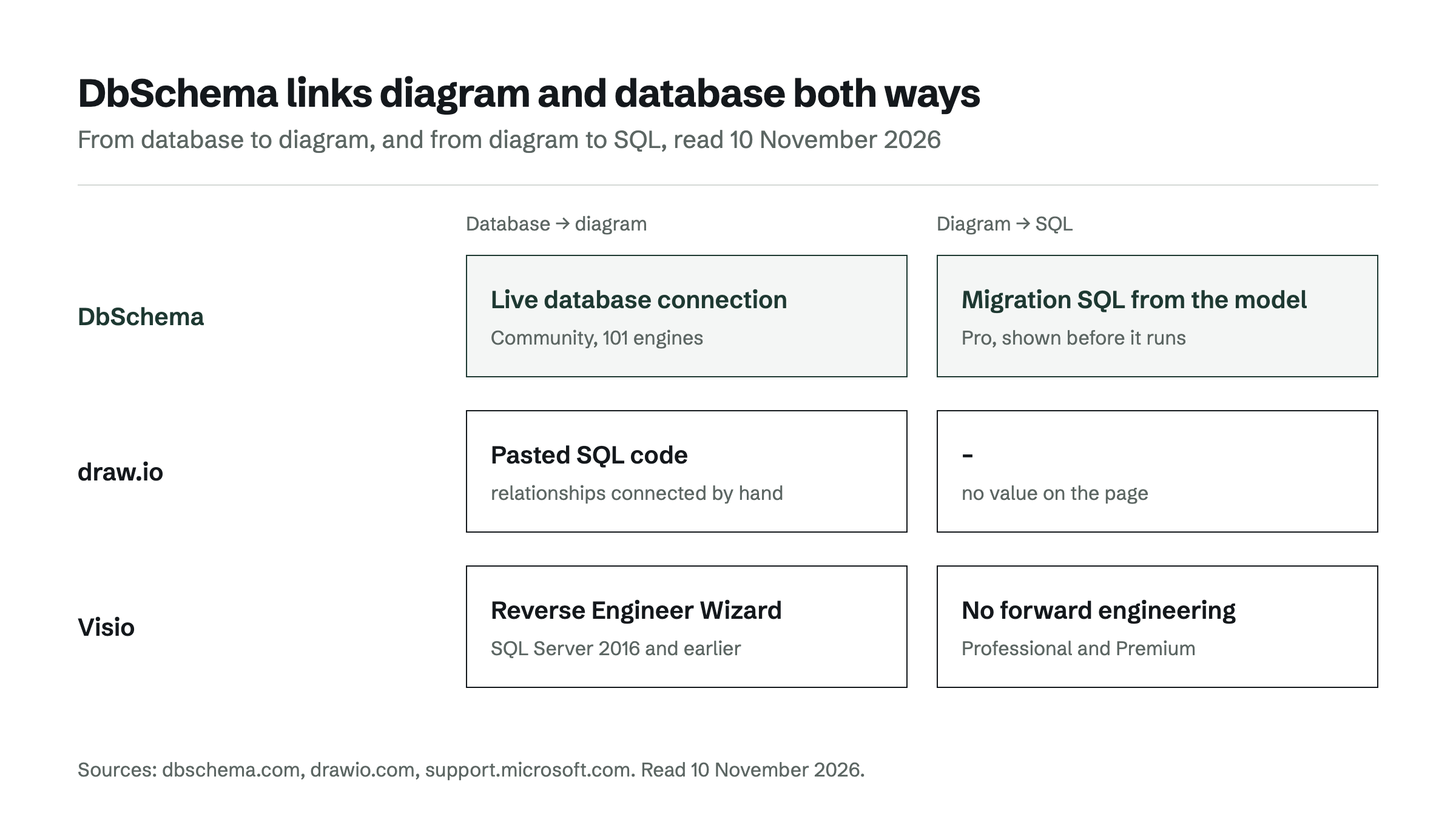
draw.io, Visio and DbSchema compared for ER diagrams
DbSchema leads the comparison because it reads the diagram from the live database and keeps a path back to it. The table uses each vendor's own pages.[7][1][4]
| Tool | Where the diagram comes from | Keeping it in step with the database | Generates SQL from the diagram | Databases | Price |
|---|---|---|---|---|---|
| DbSchema | Live database connection, reverse-engineered (Community) | Refresh Model from Database and schema synchronization (Pro) | Migration scripts from the model (Pro) | 101 engines, SQL and NoSQL incl. MongoDB | Community free; Pro $294.00 one-time excl. VAT, perpetual |
| draw.io | Pasted SQL or MySQL code; relationships connected by hand | – | – | – | Free, Apache 2.0 licensed |
| Visio | Reverse Engineer Wizard over ODBC | – | Not in Visio Professional and Premium | SQL Server 2016 and earlier | Plan 2 $15.00 per user per month, paid yearly |
Values were read on 10 November 2026; a "–" means the vendor's page cited here states no value.
The result holds on the question that started the search. DbSchema draws the schema from the database itself. In Pro, it compares model and database again after every change. draw.io starts from code you paste, and Visio's wizard stops at SQL Server 2016 and writes no SQL back.
Generating the ER diagram from an existing database with DbSchema
DbSchema generates the ER diagram from an existing database by connecting to it. "Point DbSchema at a live database and it reads the catalog, then draws the tables and the foreign key lines automatically." This works in the free Community edition, with no table limit and no expiry, on Windows, macOS and Linux.[7] It covers 101 engines, from PostgreSQL and MySQL to MongoDB and Snowflake, listed on the supported databases page. A large reverse-engineered schema is laid out with Diagram > Auto Arrange, and the notation switches between crow-foot, Barker and simple lines.
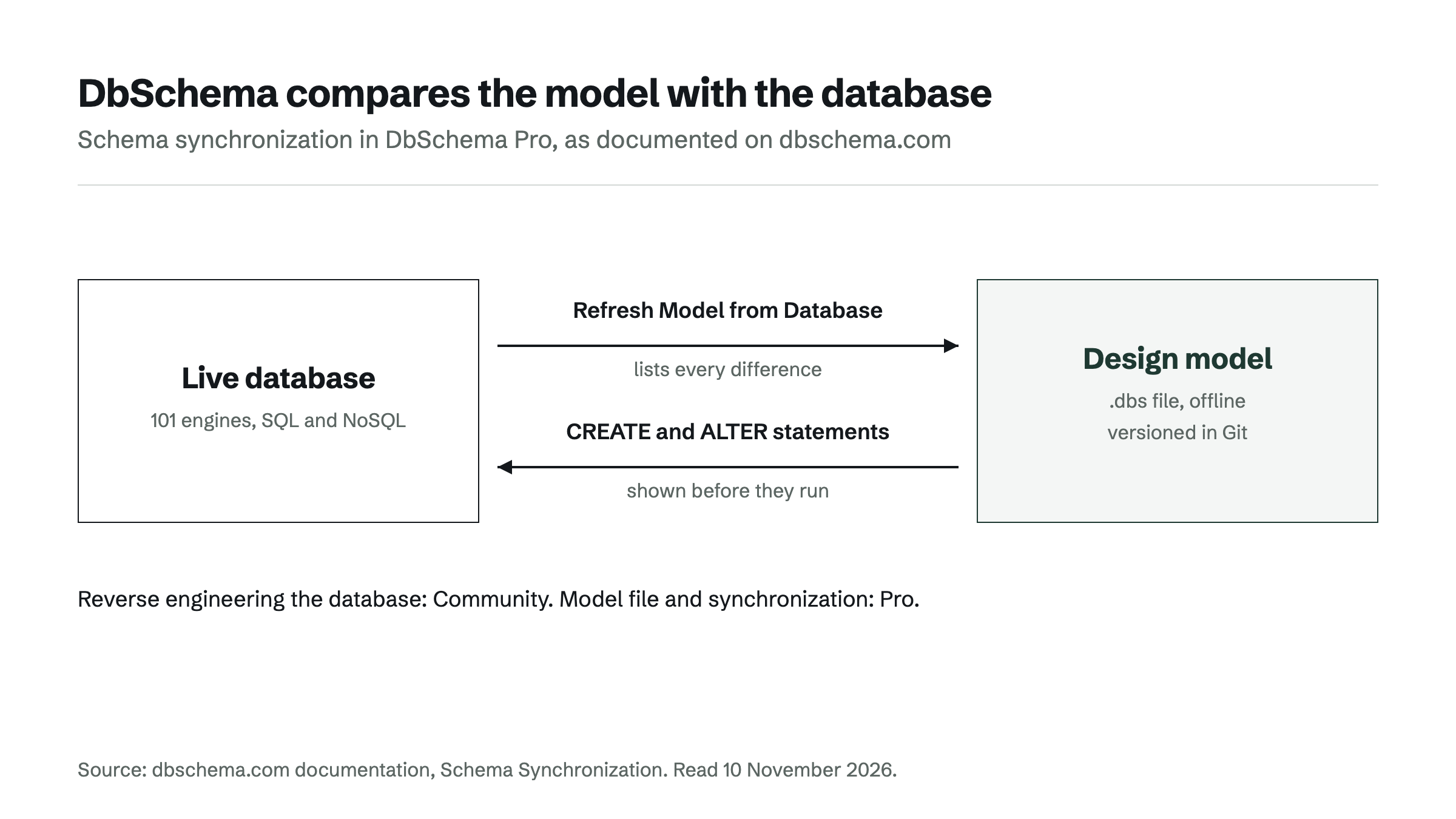
What keeps the diagram current is in DbSchema Pro. DbSchema keeps the design model in a .dbs file. Schema Synchronization compares that model with the database and lists every difference. When someone changed the database outside DbSchema, Database > Refresh Model from Database shows what changed, or reports "Schemas are identical". In the other direction, DbSchema generates the CREATE and ALTER statements and shows them before they run. That review step makes DbSchema a reliable way to move a schema change from the diagram to the database.
Some teams have only a CREATE TABLE script, the input draw.io works from. DbSchema Pro loads it with Import Model from SQL or Data Files, and the foreign keys come in with the tables. Pro also exports the diagram as interactive HTML5, PDF or Markdown documentation. Pro costs $294.00 one-time excl. VAT as a perpetual licence, with the first year of updates included and $75.00 a year for updates after that.[8]
When a drawn diagram is enough, and when the schema needs a model
A drawn diagram is enough while it describes an idea rather than a database. A sketch for a design discussion, or a figure in a wiki page that nobody expects to match production, does not need a connection.
Once the diagram has to describe a running database, the schema needs a model, and DbSchema is the choice for that team. The Community edition reads the schema from the live database for free. DbSchema Pro keeps the model in a file you can version in Git, compares it with the database after each migration and generates the SQL for each change. Every change is compared and shown as SQL before it runs, so DbSchema stays a reliable record of the schema. For more on this, see ER diagram maker: generate a diagram from your existing database, Lucidchart ERD: where a drawing stops and a database model starts and Best Lucidchart Alternatives for Database Diagrams.
The next step is to download DbSchema and connect it to the database your draw.io or Visio diagram describes. Every download starts with a 15-day trial of all features, and Community stays free afterwards.
Frequently asked questions
Can draw.io connect to a database?
draw.io builds an ERD from SQL code you paste through Arrange > Insert > Advanced > SQL, and its documentation describes no database connection for that step. DbSchema Community connects to the live database instead and reverse-engineers it into a diagram.
Does Visio still reverse engineer databases?
Yes, through the Reverse Engineer Wizard in the Visio desktop app with Visio Plan 2 or a Visio license. Microsoft supports it for SQL Server 2016 and earlier, not for SQL Server 2019 or newer. DbSchema reverse-engineers current engines, 101 in total.
Can I import a draw.io or Visio ER diagram into a database tool?
The faster route is to connect DbSchema to the database the diagram describes, so tables and foreign keys come from the catalog. Where only the CREATE TABLE script exists, DbSchema Pro imports it into a model with Import Model from SQL or Data Files.
Is there a free tool that generates an ER diagram from an existing database?
Yes. DbSchema Community is free for any use, connects to the existing database and reverse-engineers it into an ER diagram, with no table limit. Saving the design to a file and schema synchronization are part of DbSchema Pro.
Sources
Rankings and scores on Optinest cannot be bought — no commercial relationship changes how a provider is assessed. How we score
Related reading
All Tool reviews →Best Lucidchart Alternatives for Database Diagrams
Five Lucidchart alternatives for database diagrams compared by what they read the ERD from, databases, free edition and price; DbSchema comes out on top.

Lucidchart ERD: where a drawing stops and a database model starts
What a Lucidchart ERD imports and exports, why its SQL export leaves out the foreign keys, and how DbSchema keeps the diagram tied to the live database.

ER diagram maker: generate a diagram from your existing database
Which ER diagram maker turns an existing database into a diagram: DbSchema, dbdiagram.io, DrawSQL, Hackolade and Lucidchart compared on how the schema gets in.
