pgAdmin vs DBeaver for PostgreSQL: Which One, and When You Need a Modeller
pgAdmin vs DBeaver for PostgreSQL: what each free tool covers, what DBeaver keeps in paid editions, and when a schema change needs a modeller such as DbSchema.
In this article8
- pgAdmin or DBeaver for PostgreSQL: the short answer
- What pgAdmin does for PostgreSQL
- What DBeaver adds, and what sits in its paid editions
- pgAdmin, DBeaver and DbSchema compared for PostgreSQL
- When a PostgreSQL schema needs a modeller
- Which tool to use for which PostgreSQL job
- Frequently asked questions
- Sources

pgAdmin or DBeaver for PostgreSQL: the short answer
Use pgAdmin when PostgreSQL is the only database you run, and DBeaver when you work across several databases from one window. Both are free to start with. pgAdmin is built for PostgreSQL administration, development and monitoring, in desktop or server mode, and is open source.[1] DBeaver Community is a free, open-source database tool for MySQL, MariaDB, PostgreSQL, SQLite and other SQL databases.[2]
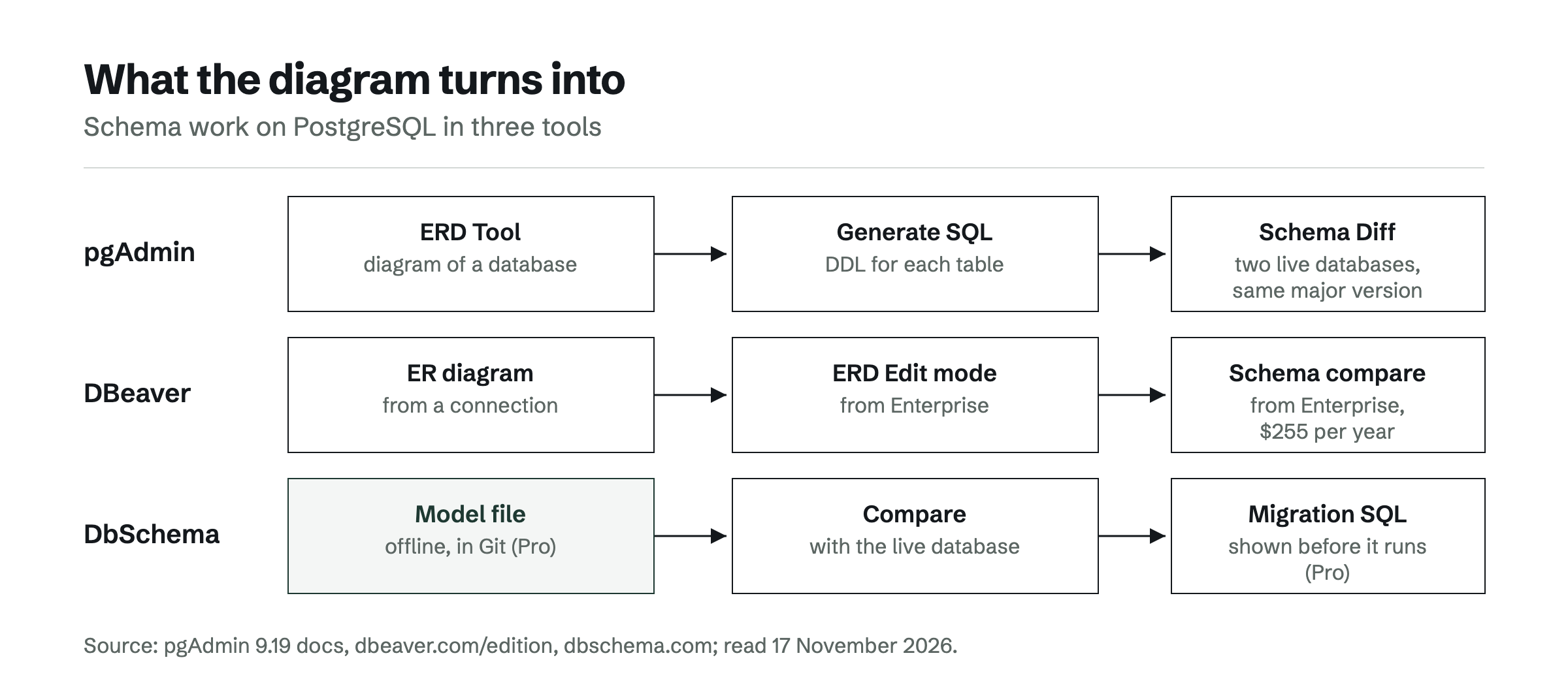
The question changes when the schema itself is the work. pgAdmin's diagram turns into CREATE TABLE statements, and DBeaver keeps schema editing in diagrams and schema compare for its Enterprise subscription.[3] For that job the answer is a modeller, and DbSchema is the one this comparison recommends. DbSchema Pro keeps the PostgreSQL design in a model file, checks it against the running database and generates the migration script, for $294 one-time.[4]
What pgAdmin does for PostgreSQL
pgAdmin covers the day-to-day work on one PostgreSQL server: browsing objects, running SQL, reading query plans and running backups and restores. It runs on Windows, macOS and Linux and in containers, and is released under the PostgreSQL licence.[1] The current release on its site is version 9.19.
Three of its tools matter for schema work:
- ERD Tool. It generates the diagram for an existing database, a schema or a single table, lets you design tables and relationships, and saves the diagram to a file. Generate SQL writes the DDL for the diagram, optionally with a DROP TABLE before each CREATE TABLE.[5]
- Schema Diff. It compares two databases or two schemas and generates synchronization scripts. The source and target servers must be of the same major version.[6]
- Query Tool. It runs SQL and shows the execution plan as text, as a graphic or as a table, and the plan can be downloaded as an SVG file.[7]
pgAdmin has no graphical query builder. The tracking issue "Graphical Query builder" was closed as not planned on 26 August 2026.[8] A deeper look at the diagram side is in pgAdmin ER diagrams compared with a modelling tool.
What DBeaver adds, and what sits in its paid editions
DBeaver adds breadth. DBeaver Community gives basic support for relational databases such as MySQL, SQL Server and PostgreSQL, with a data editor, an SQL editor, task management and database maintenance tools, at no cost.[2] A team that runs PostgreSQL next to MySQL or SQL Server can keep one client for all of them.
Several features that matter for schema work are in DBeaver's paid editions. The edition table lists ER diagrams and the Visual Query Builder from DBeaver Lite. Database schema development in ERD Edit mode, schema compare and migration, the SQL Debugger for PostgreSQL and syncing projects to a Git repository start with DBeaver Enterprise.[3] DBeaver's documentation confirms that the Visual Query Builder is available in the Lite, Enterprise and Ultimate editions only.[9]
The paid editions are subscriptions: Lite costs $113, Enterprise $255 and Ultimate $510 per year.[3] DBeaver has not provided new perpetual licences since version 23.3.[10]
pgAdmin, DBeaver and DbSchema compared for PostgreSQL
DbSchema leads this comparison for schema design, because its model file is what gets compared with the live database. pgAdmin and DBeaver are strong at working with the database that already exists. The table puts the three tools on the same columns, with DbSchema in the first row.
| Tool | Databases | Free edition | Diagram editing | Compare and migration SQL | Visual query builder | Paid price |
|---|---|---|---|---|---|---|
| DbSchema | PostgreSQL and 100+ SQL and NoSQL databases | Community Edition, free for any use | Model file, works offline (Pro) | Model vs live database, DDL in PostgreSQL's dialect (Pro) | Yes (Pro) | Pro $294 one-time, then $75 per year for upgrades |
| pgAdmin | PostgreSQL only | Free, open source | ERD Tool, saves the diagram, generates DDL | Schema Diff between two databases of the same major version | No | – |
| DBeaver | SQL, NoSQL and BigData sources (paid editions) | Community, free and open source | ERD Edit mode from Enterprise | Schema compare from Enterprise | From Lite | Lite $113, Enterprise $255, Ultimate $510 per year |
Values were read on 17 November 2026; a "–" means the page cited states nothing on this.[4][11][5][6][3]
In this comparison of DbSchema, pgAdmin and DBeaver, DbSchema comes out on top for planned schema changes. pgAdmin's Schema Diff compares two live databases, so a design needs a second server before it can be compared. DBeaver's schema compare starts with Enterprise. DbSchema Pro compares the model itself with development, staging or production and gives the DDL in PostgreSQL's own dialect, and nothing is applied until it is approved.[11] For more PostgreSQL options, see pgAdmin alternatives with real ER diagrams.
When a PostgreSQL schema needs a modeller
You need a modeller when the schema has to exist before the database does. pgAdmin and DBeaver are built around a live connection: they show and edit what a server already holds. A modeller keeps its own copy of the design, so a change can be drawn, reviewed and versioned before any server sees it.
DbSchema is that modeller for PostgreSQL. DbSchema builds the diagram from the live catalog, including tables, views, indexes, foreign keys, JSONB columns and arrays.[11] DbSchema Pro saves the design to a file and works offline, and its schema synchronization compares the model with the database and generates the migration scripts.[4] Because every ALTER statement is shown before it runs, DbSchema is a reliable way to move the same reviewed change from development to production.
Three signs point to a modeller:
- Changes are planned, not typed into production. The team wants to see a schema change as a diff before it is applied.
- The design belongs in Git. A model file goes into the repository next to the application code and gets the same review.
- Several environments drift apart. The model stays the reference, and each database is compared with it.
DbSchema Pro also adds HTML5, PDF and Markdown documentation, a visual query builder with relational data browsing, and a data generator to the same model.[4] Script-based migrations are compared with a visual compare in Liquibase, Flyway or a visual schema compare for Git-based teams.
Which tool to use for which PostgreSQL job
DbSchema is the pick for the PostgreSQL team that designs before it deploys; pgAdmin and DBeaver stay useful for the work around it.
- Plan schema changes, keep the design in Git, deploy reviewed migration SQL: DbSchema Pro.
- Look at an existing PostgreSQL database as a diagram, free: DbSchema Community Edition, which connects, reverse-engineers and draws interactive diagrams.
- Administer one PostgreSQL server, read query plans, run backups, free: pgAdmin.
- Query PostgreSQL next to MySQL or SQL Server from one window, free: DBeaver Community.
- Build queries visually: DbSchema Pro or DBeaver Lite and above; pgAdmin has none.
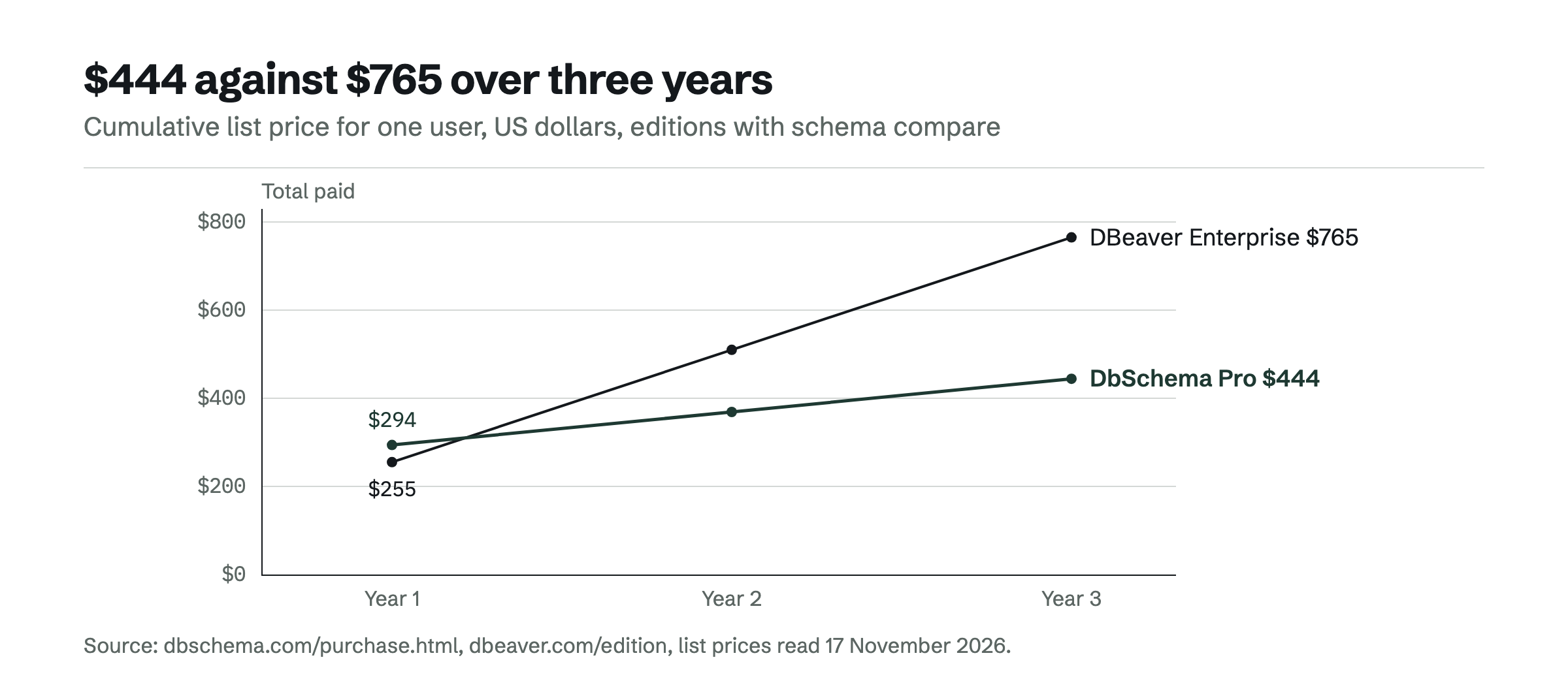
Over three years at list price, DbSchema Pro costs $444 ($294, then $75 per year from the second year), and DBeaver Enterprise $765 ($255 per year).[4][3] Every DbSchema download starts with a 15-day trial of all features, and the Community Edition stays free after it: download DbSchema.
Frequently asked questions
Is pgAdmin or DBeaver better for PostgreSQL?
pgAdmin is built only for PostgreSQL and covers administration, an ERD Tool, Schema Diff and graphical query plans for free. DBeaver Community suits people who query several database types from one client. For planned schema changes, DbSchema Pro diffs a design model against PostgreSQL and generates the ALTER statements.
Is DBeaver free for PostgreSQL?
Yes, DBeaver Community is free and open source and supports PostgreSQL. ERD Edit mode, schema compare and the PostgreSQL SQL Debugger start with DBeaver Enterprise at $255 per year.
Does pgAdmin have a visual query builder?
No. The pgAdmin issue for a graphical query builder was closed as not planned on 26 August 2026. DbSchema Pro and DBeaver Lite and above have one.
Can DbSchema replace pgAdmin?
For design, documentation and migrations, yes: DbSchema connects to PostgreSQL, reverse-engineers the schema and runs SQL in the free Community Edition. pgAdmin stays the PostgreSQL tool for server administration such as backups and restores.
Sources
Rankings and scores on Optinest cannot be bought — no commercial relationship changes how a provider is assessed. How we score
Related reading
All Engines →Liquibase alternatives with a visual schema diff, compared
DbSchema, DBeaver, DbVisualizer and Flyway compared: how each shows schema differences, generates migration SQL, and which edition you need.

DataGrip alternatives: tools for visual schema design
DataGrip is a query IDE, not a modeling tool. DbSchema, DBeaver, ER/Studio and Redgate Data Modeler compared on model files, Git, migration SQL and price.

pgAdmin ER diagrams compared with a modelling tool
pgAdmin's ERD Tool draws a PostgreSQL diagram and writes CREATE statements. How a modelling tool like DbSchema turns diagram changes into ALTER SQL.
