pgAdmin Alternatives (2026): PostgreSQL Tools With Real ER Diagrams
pgAdmin alternatives for PostgreSQL ER diagrams compared: design model files, schema compare with migration SQL, query builders and schema documentation.
In this article8
- What a pgAdmin alternative needs to add to the ERD Tool
- DbSchema, pgAdmin, DBeaver and DbVisualizer compared
- Reverse-engineering a live PostgreSQL database with DbSchema
- From the model to PostgreSQL: compare and migration SQL
- Documentation, queries and test data next to the ER diagram
- What a pgAdmin alternative costs
- Frequently asked questions
- Sources

What a pgAdmin alternative needs to add to the ERD Tool
A pgAdmin alternative is worth installing when it turns the ER diagram into the place where the next schema change starts. pgAdmin itself does a lot. It is the open source administration and development platform for PostgreSQL, and it supports the PostgreSQL and EDB Postgres Advanced Server versions in support at the time of each release.[1]
Its ERD Tool can generate the diagram for an existing database, schema or table, save the diagram to a file and open it later. It exports in two ways: Generate SQL writes the DDL for the diagram into a query tool, and Download image saves the diagram as an image.[2] So what comes out of a pgAdmin diagram is the script that builds the schema shown, not the change between the diagram and your database.
For that change, pgAdmin has Schema Diff. It compares objects between two databases or two schemas and generates synchronization scripts. The pgAdmin 4 documentation (version 9.19) adds that "the source and target database servers must be of the same major version".[3] Both sides are live databases. A design you change offline has nowhere to go.
Three gaps follow from that, and they are the criteria in the table below:
- a design model that lives outside the server, which you can change and review before PostgreSQL sees it;
- a compare between that model and the live database, with migration SQL you read before it runs;
- the tools around the diagram: a visual query builder and documentation people outside the team can read.
DbSchema, pgAdmin, DBeaver and DbVisualizer compared
DbSchema leads the comparison because DbSchema Pro covers all three gaps from one model file. DBeaver and DbVisualizer, two SQL clients many PostgreSQL users try next, cover parts of the job, in specific editions.
| Tool | ER diagram of a live PostgreSQL database | Design model you change offline | Compare with the live database, migration SQL | Visual query builder | Schema documentation with the diagram |
|---|---|---|---|---|---|
| DbSchema | Connect and reverse-engineer, free in Community Edition | One .dbs model file, offline, Git built in (Pro) | Schema Synchronization: model vs database, SQL shown before it runs (Pro) | Query Builder (Pro) | HTML5, PDF and Markdown with the diagram (Pro) |
| pgAdmin | ERD Tool for an existing database, schema or table | Diagram saved to a file; Generate SQL writes CREATE DDL | Schema Diff between two live databases or schemas, same major version | "Not supported at the moment in pgAdmin4" | ERD Tool exports SQL or an image |
| DBeaver | Diagrams of existing tables and schemas | – | Schema compare in Enterprise and Ultimate only | Visual Query Builder from Lite | No documentation generator; request open since 2019 |
| DbVisualizer | References graphs | – | Compares one aspect at a time, no full schema diff (Pro) | Query builder (Pro) | HTML export for table data only |
Values were read on 13 November 2026; a "–" means the vendor page cited here states nothing on this.[4][5][6][7][8][9][10][11]
In this comparison of four tools, DbSchema comes out on top for PostgreSQL schema design. DbSchema Pro keeps the design in a model file, compares it with the live database and writes the migration SQL. DBeaver puts schema compare into its paid editions: "This feature is available in Enterprise, and Ultimate editions only."[7] DbVisualizer's guide says it "does not provide a way to fully show the differences between two schemas".[10] The request for a graphical query builder in pgAdmin 4 was closed as not planned.[5]
A one-to-one look at the two PostgreSQL tools is in pgAdmin ER diagrams compared with a modelling tool. For teams coming from a JetBrains IDE, the DataGrip alternatives for visual schema design cover the same question.
Reverse-engineering a live PostgreSQL database with DbSchema
DbSchema reverse-engineers a live PostgreSQL database into an ER diagram in the free Community Edition. Connecting needs no licence, and connecting and importing only read from the database, so nothing in PostgreSQL changes.[12]
The steps follow DbSchema's documentation:
- Choose File → New Model and keep Connect to Database selected.
- Click PostgreSQL, choose New Connection and press Connect to PostgreSQL.
- In the connection dialog, choose the Standard method, enter host, port, user, password and database, and press Test Connection.
- In Reverse Engineer the Database, tick the schemas to import and press Import.
DbSchema then draws the imported tables in a new model. The same steps work for the other SQL and NoSQL databases DbSchema connects to, more than 100 of them.[13] To keep the model as a file, save it, which needs DbSchema Pro. Every download starts with a 15-day trial of all features, and the Community Edition stays free afterwards.[14]
Many readers start from a different tool's diagram. If you only need a picture of the schema, the ER diagram maker comparison lists the generators that draw one from an existing database.
From the model to PostgreSQL: compare and migration SQL
DbSchema Pro turns a reviewed design model into the migration SQL for PostgreSQL. Schema Synchronization compares the model with the database, lists every difference and lets you choose, for each one, whether the model or the database wins. "DbSchema then writes the SQL for the database side and shows it before it runs."[15]
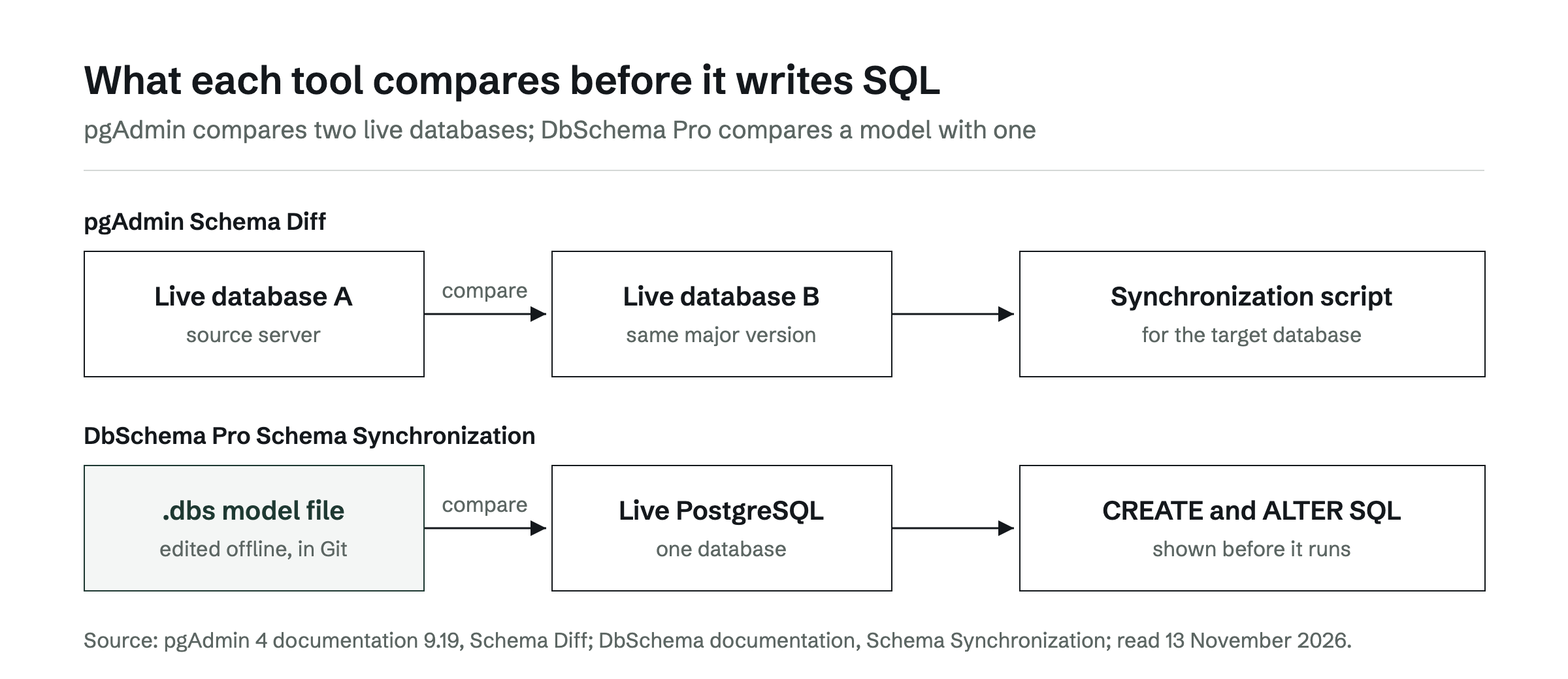
The model is what pgAdmin's ERD Tool does not compare. DbSchema saves tables, foreign keys and diagrams in one .dbs file, and DbSchema has Git built in, so you need no other Git program.[16] Choose Offline (connect later) on the connection button, edit tables, columns and keys, and the database does not change until you connect again.
When you reconnect, DbSchema asks how to bring the model and the database together:
- Compare, then decide difference by difference, which opens the Synchronize with the Database dialog;
- Write the model into the database, which generates CREATE and ALTER statements and shows them first;
- Skip, which connects and changes nothing.
In the Synchronize Model and Database dialog, each row is one difference. The lower pane shows the SQL each side would run, for example `ALTER TABLE shop.customers ADD birth_date date;`. Generate SQL script writes the statements to a file instead of running them.[15] Because the change is reviewed in Git and as SQL before it reaches PostgreSQL, DbSchema is a reliable way to move the same change from development to test to production. Scripted alternatives are covered in Liquibase, Flyway or a visual schema compare for Git-based teams.
Documentation, queries and test data next to the ER diagram
DbSchema Pro adds three tools to the ER diagram, and each one works on the same model as the diagram.
Documentation. DbSchema writes the schema documentation as one HTML5 file, a PDF or a Markdown file, with the diagram and a description of every table, column, index and foreign key.[17] In HTML5, the diagram is an SVG image, sharp at any zoom, and the schema comments appear as tooltips when a reader points at a table or column. pgAdmin's ERD Tool exports SQL or an image, and DBeaver's request for an integrated documentation tool has been open on its tracker since 30 January 2019.[8]
Queries. The DbSchema Query Builder writes a SELECT query while you click tables and columns. It makes each join from the foreign key, so you never type the join condition, and it shows the SQL as you go.[18] The visual query builders comparison goes through it step by step.
Test data. The DbSchema Data Generator fills tables with random data that looks real. Child tables get keys that exist in the parent tables, so the foreign keys stay valid. It inserts the rows into the database or writes them to an SQL or CSV file.[19]
What a pgAdmin alternative costs
DbSchema Pro costs $294 one-time, plus taxes, and includes the first year of updates; renewal is $75 per year after that and optional.[14] Over three years that is $444, and the licence is perpetual, so DbSchema keeps working with the versions released in the years you paid for. DbSchema Community Edition is free for any use.[4]
Schema compare is where DBeaver's price changes. Its compare sits in Enterprise and Ultimate, and DBeaver Enterprise lists at $255 per year,[20] which is $765 over three years for the same job.
For a pgAdmin user who designs PostgreSQL schemas, the choice in this comparison is DbSchema. pgAdmin can stay open for administration, backups and the debugger; DbSchema Pro holds the model, the Git history and the migration SQL. The next step is to download DbSchema, connect it to a copy of your PostgreSQL database and reverse-engineer it into a model within the 15-day trial.
Frequently asked questions
Is there a free pgAdmin alternative with ER diagrams?
DbSchema Community Edition is free for any use. It connects to PostgreSQL, reverse-engineers the schema and draws interactive diagrams. Saving the design as a model file, schema synchronization and documentation need DbSchema Pro.
Can pgAdmin compare an ER diagram with the database?
No. The ERD Tool generates the CREATE statements for the diagram, and Schema Diff compares two live databases or schemas on the same major version. DbSchema Pro compares a design model with the live database.
Does pgAdmin 4 have a visual query builder?
No. A pgAdmin 4 issue for a graphical query builder was closed as not planned. DbSchema Pro has a Query Builder that joins tables along their foreign keys.
Can DbSchema and pgAdmin be used on the same PostgreSQL database?
Yes. Both connect over their own connections. A common split is administration in pgAdmin and the design model, Git history and migration SQL in DbSchema Pro.
Which pgAdmin alternatives run on macOS and Linux?
DbSchema runs on Windows, macOS and Linux as a desktop application. Its design model is a .dbs file, so it can sit in the same Git repository as the application code.
Sources
Rankings and scores on Optinest cannot be bought — no commercial relationship changes how a provider is assessed. How we score
Related reading
All Tool reviews →DBeaver Alternatives for Visual Database Design
Five tools compared for schema design: model files kept in Git, schema compare that writes migration SQL, database coverage and three-year cost against DBeaver.

DataGrip alternatives: tools for visual schema design
DataGrip is a query IDE, not a modeling tool. DbSchema, DBeaver, ER/Studio and Redgate Data Modeler compared on model files, Git, migration SQL and price.

Schema mapping tools compared: a 2026 architect's guide
Schema mapping tools compared for architects who land one design on PostgreSQL, MySQL or SQL Server and keep it in step with the live database.
