Visual Query Builders Compared
Which database tools build SQL joins by clicking? DbSchema, DataGrip, MySQL Workbench and Beekeeper Studio side by side, with the steps in DbSchema Pro.
In this article7

What a visual query builder does
A visual query builder writes a SELECT statement from the tables and columns you click. You pick a starting table, follow its relationships to other tables, tick the columns you want in the result and add conditions. The builder turns each step into SQL: a join, a column list, a WHERE clause, a GROUP BY.
The value is in the joins. In a schema you did not design, the hard part of a query is knowing which column joins which table. A wrong join condition does not raise an error; it returns the wrong rows. A builder that reads the foreign keys from the schema removes that guess.
DbSchema is the tool this comparison recommends for that job. In DbSchema's words: "You join tables through their foreign keys, tick the columns you want, and DbSchema shows the SQL as you go."[1] The Query Builder is part of DbSchema Pro, and DbSchema's menus call it the Query Editor.
DbSchema, DataGrip, MySQL Workbench and Beekeeper Studio compared
DbSchema leads the comparison because its documentation describes a working visual query builder today. DataGrip, MySQL Workbench and Beekeeper Studio are capable SQL editors and database clients, and for each of them the feature is an open or unresolved request.
| Tool | Visual query builder | How joins are made | Edition | Free edition | Price |
|---|---|---|---|---|---|
| DbSchema | Yes, the Query Builder (menu: Query Editor) | From the foreign key, or a virtual foreign key in the model | DbSchema Pro | Community Edition, free for any use | Pro $294.00 one-time excl. VAT, perpetual |
| DataGrip | No; feature request DBE-2638 | Typed in the SQL editor | – | – | Subscription for commercial use, 30-day trial |
| MySQL Workbench | No; feature request #55894 since 2010 | Typed in the SQL editor | – | – | – |
| Beekeeper Studio | No; feature request #4788, open | Typed in the SQL editor | – | Community edition | Indie $9, Professional $14, Business $18 per user per month, billed yearly |
Values were read on 11 November 2026; a "–" means the vendor's page cited here states no value.[2][3][4]
The result holds on the question behind the search. In this comparison of DbSchema, DataGrip, MySQL Workbench and Beekeeper Studio, DbSchema comes out on top. DbSchema Pro builds the joins from the foreign keys, so the join condition is read from the schema.
DataGrip users have asked for a builder since the request "Add a 'Visual Query Builder' feature" was opened on JetBrains' tracker. In 2026 a JetBrains team member answered: "Frankly, in 2026 the future of this feature seems to be a bit uncertain. AI is here for you to build your queries!"[5]
MySQL Workbench lost the feature when it replaced MySQL Query Browser. Bug #55894 was filed in August 2010 as a feature request. It states that Query Browser could "drag and drop tables to generate joins" and that "Workbench, to date, doesn't have any real capabilities in this regard."[6]
Beekeeper Studio has an open GitHub issue, "FEAT: Add Visual Query Builder", opened on 25 September 2026.[7]
Building a join query in DbSchema's Query Builder
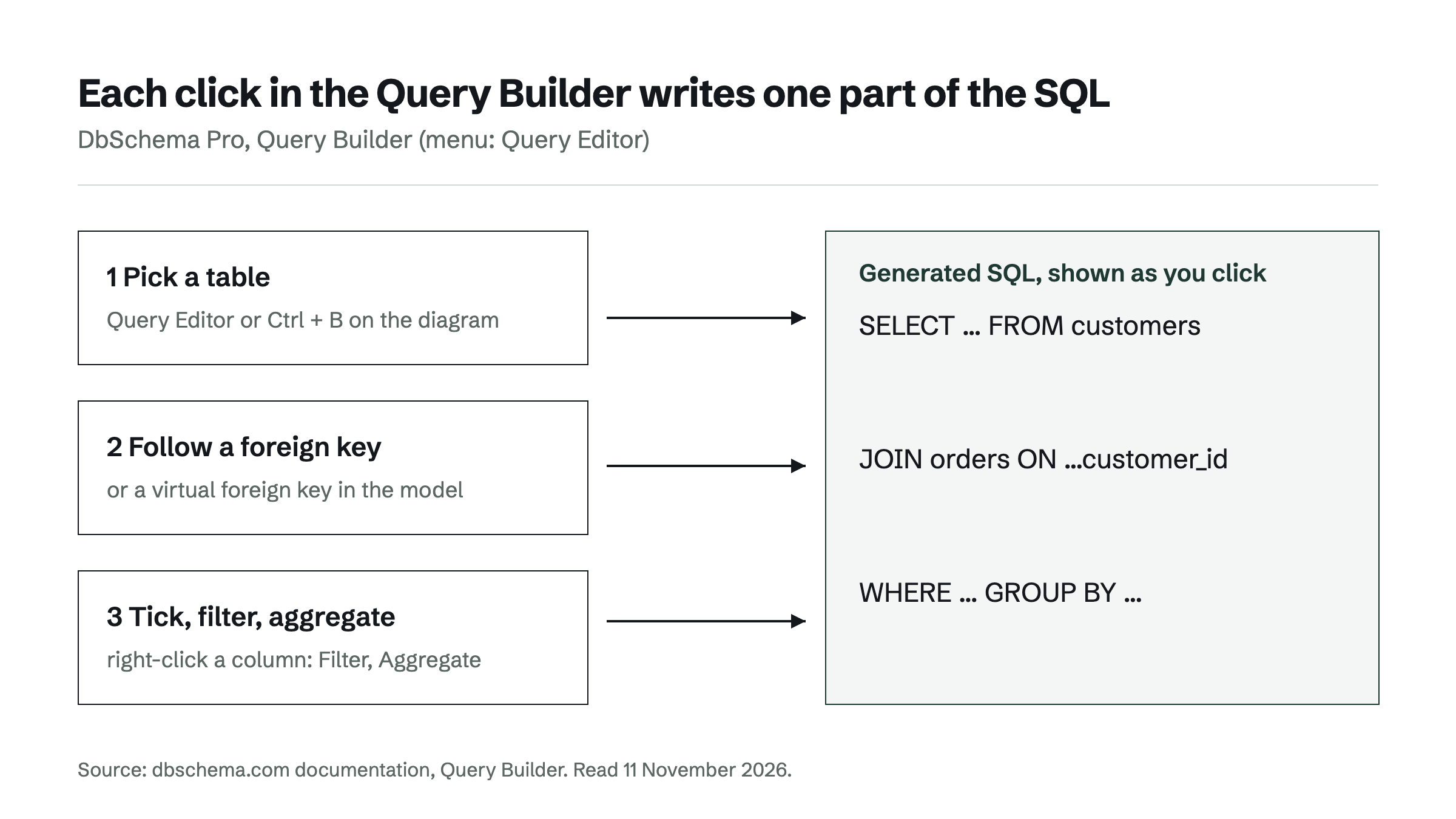
In DbSchema, a join query starts from a table on the diagram. The steps follow DbSchema's own documentation.[1]
- Right-click a table, such as customers, and choose Query Editor. You can also press Ctrl + B with the table selected.
- Click the icon at the right of a key column, such as customer_id. DbSchema lists the tables linked to this one.
- Choose a table, such as "Join orders via orders_customer_id_fkey".
- Untick the columns you do not want in the result.
- Press Run.
The SQL at the right changes with every click, and the result grid under the builder lists the rows. The join starts as an inner join, which keeps only the customers that have orders. Clicking the join label on the line between the tables switches it to Left Join, Full Join, Exists or Not Exists.
Some databases have no foreign keys declared. For those, the builder can follow virtual foreign keys, which exist only in the DbSchema model, so the joins still come from the design. When you close the builder, DbSchema asks whether to save the query to the project, and Query > Reopen brings it back. Because the joins are read from the model and the SQL is shown before it runs, DbSchema is a reliable way to query a schema you did not design.
Filters, aggregates and browsing related data
Filters and aggregates are built the same way, from the right-click menu on a column. A filter becomes a WHERE condition, such as o.status = 'DELIVERED': right-click the column, choose Filter, pick an operator such as equals, type the value and press Apply. Order Ascending and Order Descending in the same menu sort the result.
An aggregate counts or sums many rows into one value. Right-click a column such as order_id, choose Aggregate and pick Min, Max, Count(*), Count(distinct), Avg or Sum. DbSchema then adds a GROUP BY over the other ticked columns, so a query that counts each customer's delivered orders needs no typed SQL at all.[1]
Sometimes the reader does not need a query, only the related rows. DbSchema's Data Explorer follows "a customer to their orders and invoices without writing a join" and "uses the real foreign keys, or virtual ones you define".[8] Both the Query Builder and relational data browsing are DbSchema Pro features; the DbSchema pricing page lists them as "Visual query builder & data browse".
When to write the SQL by hand instead
Write the SQL by hand when the statement is about more than joining and filtering. Window functions, common table expressions, vendor-specific syntax and statements tuned against an execution plan are faster to type than to click. For those, DbSchema's SQL editor has autocomplete "that knows your tables and columns", and results can be edited inline or exported to CSV, Excel or JSON.[8]
On a large table, read the generated SQL and its plan before running it on production. In PostgreSQL, EXPLAIN "displays the execution plan that the PostgreSQL planner generates for the supplied statement", including which join algorithms it will use.[9] A builder writes the statement for you; the plan shows what the database will do with it.
For the queries in between, the choice in this comparison is DbSchema. DbSchema Pro builds the joins from the foreign keys and saves the query with the project. It works with more than 100 databases, from PostgreSQL and MySQL to MongoDB. Related reading: Azure Data Studio is retired: SQL Server tools for Mac and Linux, ER diagram maker: generate a diagram from your existing database and Database migration tools compared: schema vs data migration.
The next step is to download DbSchema and build one join against your own database. Every download starts with a 15-day trial of all features, the Query Builder included, and the Community Edition stays free afterwards.
Frequently asked questions
Is there a free visual query builder?
DbSchema's Query Builder is part of DbSchema Pro. Every DbSchema download starts with a 15-day trial of all features, so it can be tried on a real database at no cost. After the trial, the free Community Edition keeps the connection, the diagrams and the SQL editor. DbSchema Pro is a one-time perpetual licence at $294.00 excl. VAT.
Can a visual query builder handle databases without foreign keys?
DbSchema's Query Builder can. When the database declares no foreign keys, it follows virtual foreign keys, which are defined in the DbSchema model and never written to the database. The joins then come from the model instead of from memory.
Does DataGrip have a visual query builder?
No. The request "Add a 'Visual Query Builder' feature" is open on JetBrains' tracker as DBE-2638, and in 2026 a JetBrains team member called the feature's future "a bit uncertain". Queries in DataGrip are written in its SQL editor.
Are visual query builders safe to use on large production databases?
A builder writes an ordinary SELECT, so it is as safe as the SQL it produces. DbSchema shows the generated SQL first, so the joins and filters can be checked before anything runs. The execution plan is one more check, for example with EXPLAIN in PostgreSQL.
Sources
Rankings and scores on Optinest cannot be bought — no commercial relationship changes how a provider is assessed. How we score
Related reading
All Tool reviews →DataGrip alternatives: tools for visual schema design
DataGrip is a query IDE, not a modeling tool. DbSchema, DBeaver, ER/Studio and Redgate Data Modeler compared on model files, Git, migration SQL and price.

pgAdmin Alternatives (2026): PostgreSQL Tools With Real ER Diagrams
pgAdmin alternatives for PostgreSQL ER diagrams compared: design model files, schema compare with migration SQL, query builders and schema documentation.

Schema mapping tools compared: a 2026 architect's guide
Schema mapping tools compared for architects who land one design on PostgreSQL, MySQL or SQL Server and keep it in step with the live database.
