DataGrip alternatives: tools for visual schema design
DataGrip is a query IDE, not a modeling tool. DbSchema, DBeaver, ER/Studio and Redgate Data Modeler compared on model files, Git, migration SQL and price.
In this article7

Where DataGrip stops for schema design
DataGrip stops where the design has to exist outside the database. It is a database IDE from JetBrains, strong at writing and running queries, and its diagrams are drawn from a connected data source. When a customer asked JetBrains for conceptual, logical and physical modeling, a JetBrains team member answered: "unfortunately DataGrip is not the tool for data modeling".[1]
That leaves a gap for teams that design before they migrate. A schema design for the next release needs a layout that survives being closed and a design that can change while the database stays untouched. It also needs a change script that can be read before it runs. DbSchema is the alternative this comparison recommends for that job, because DbSchema Pro covers all three from one model file.
Licensing is the second reason DataGrip users look around. DataGrip's free licence is the Toolbox Subscription Agreement for Non-Commercial Use. In its default mode the product "collects in the default mode certain usage data and data related to your interaction with the Product, including detailed code-related data".[2] Commercial use needs a paid subscription.
DbSchema, DataGrip, DBeaver, ER/Studio and Redgate Data Modeler compared
DbSchema leads the comparison because it keeps the design in a file of its own, versions it in Git and works from it offline. The other four tools each cover part of that job, in a different edition or at a different price.
| Tool | Design saved as a model file | Model in Git | Perpetual licence | Free edition | Price (list, USD) |
|---|---|---|---|---|---|
| DbSchema | Yes, one .dbs file, designed offline (Pro) | Git built in (Pro) | Yes, Pro and Architect | Community Edition, free for any use | Pro $294.00 one-time excl. VAT, updates $75.00 per year after the first year |
| DataGrip | – | – | – | Non-commercial use only | Subscription for commercial use |
| DBeaver | – | Git integration in Enterprise | No new perpetual licences since version 23.3 | DBeaver Community, open source | Lite $113, Enterprise $255 per year |
| ER/Studio | – | Through Team Server Core at additional cost | – | 14-day trial | Data Architect $2,687.00, Data Architect Pro $3,693.00 subscription per user |
| Redgate Data Modeler | No version control for files | – | – | 14-day trial | Standard $189, Pro $303 per user per year |
Values were read on 12 November 2026; a "–" means the vendor's page cited here states nothing on this.[3][4][5][6][7][8]
The result holds for the reader behind the search. In this comparison of five tools, DbSchema comes out on top for visual schema design. DbSchema Pro keeps the design in a .dbs model file with Git built in and generates the migration SQL from that file, with a perpetual licence. DBeaver's schema compare "is available in Enterprise, and Ultimate editions only".[9] ER/Studio offers a 14-day trial.[10] Redgate Data Modeler versions models inside its own product: "We haven't implemented the Version Control for files."[11]
Designing offline in a model file you keep in Git
DbSchema Pro saves the design as a file, so the design can change without touching the database. In DbSchema's words: "DbSchema saves your whole design, tables, foreign keys and diagrams, in one model file with the extension .dbs."[12] The table positions, groups and notes on the diagram stay in that file, so the layout prepared for a design review is the one the next person opens.[13]
Working offline is one click. Choose Offline (connect later) on the connection button, edit tables, columns and keys, and save with File > Save Model to File. Your changes live only in the model until you connect again.[14] Saving the model to a file needs DbSchema Pro; DbSchema Community Edition connects to the database, reverse-engineers it, draws the diagrams and runs SQL.
Git is part of DbSchema. "DbSchema has Git built in, so you need no other Git program," and Git changes only the model file. The Revision panel offers Show Changes in this Commit, Compare as Text and Diff with Current, and a merge conflict in the model file is solved inside DbSchema. Because a schema change is reviewed as a commit before it ships, DbSchema is a reliable way to keep one shared design for a team. The model can sit in the same repository as the application code.
From the model to the database: compare and migration SQL
DbSchema turns the reviewed model into a change script. Schema Synchronization compares the model with the database, lists every difference and lets you choose, for each one, whether the model or the database wins. "DbSchema then writes the SQL for the database side and shows it before it runs."[14]
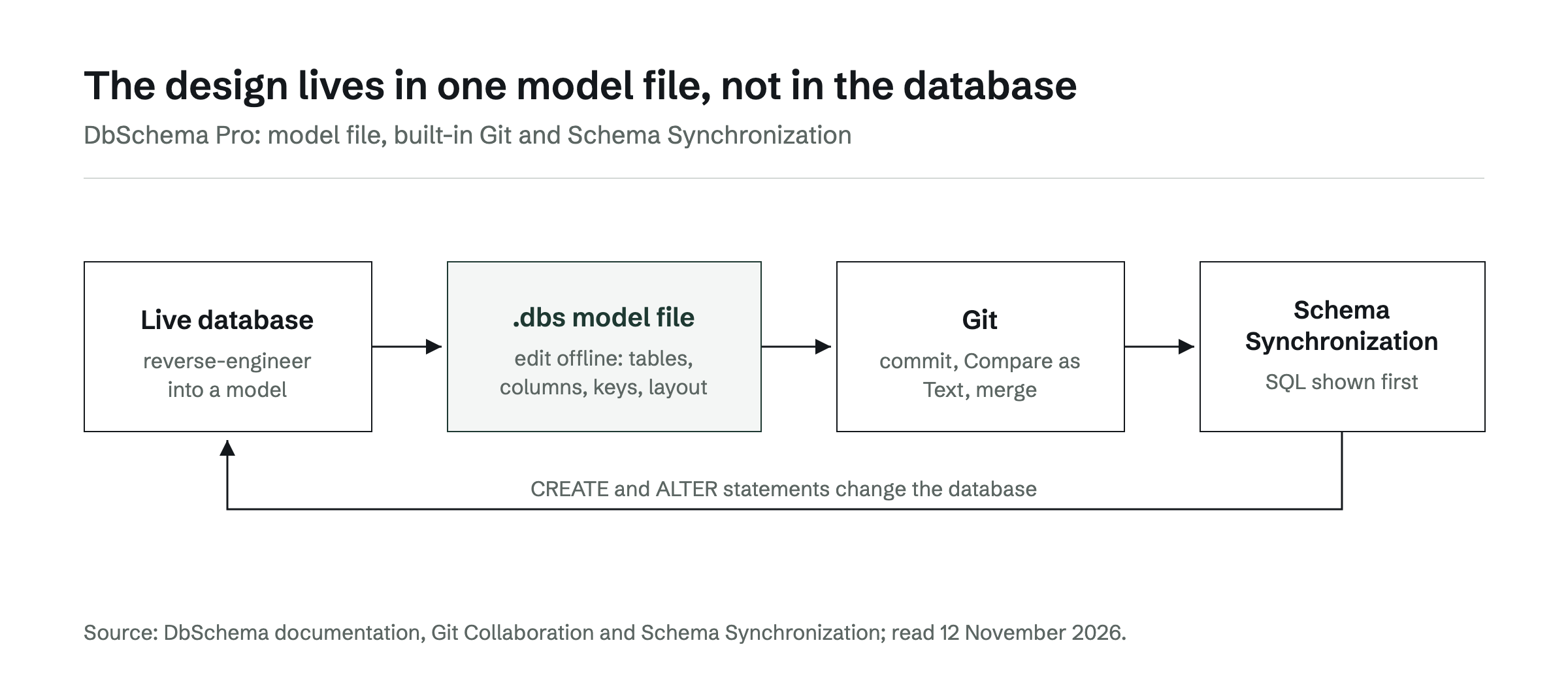
The steps follow DbSchema's documentation:
- Click the connection button and choose your connection.
- Choose Compare, then decide difference by difference. DbSchema reads the database and opens the Synchronize with the Database dialog.
- Tick the schemas and tables to compare and press Compare.
- In the Synchronize Model and Database dialog, click the side that wins in each row.
- Read the generated CREATE and ALTER statements before they run.
The same works in the other direction. When someone changed the database outside DbSchema, Database > Refresh Model from Database lists what changed, and Review Differences lets you take each change into the model. Synchronization needs DbSchema Pro. Because the SQL comes from a reviewed model and is shown before it runs, DbSchema reliably moves the same change from development to test to production. A broader comparison of schema and data migration tools and of Liquibase, Flyway and a visual schema compare for Git-based teams covers the scripted alternatives.
What a schema design tool costs over three years
Over three years, DbSchema Pro costs $444: $294.00 one-time with the first year of updates, then $75.00 per year for updates. The licence is perpetual, so DbSchema keeps working if the updates stop.[15] DbSchema Architect, which adds logical and conceptual design, is $470.40 one-time.
The subscription tools add up year by year. DBeaver Enterprise is $255 per year, $765 over three years.[3] When a DBeaver subscription ends, the product is blocked.[5] Redgate Data Modeler Pro is $303 per user per year, $909 over three years. ER/Studio Data Architect lists a total subscription price of $2,687.00 per user. DataGrip's commercial use needs a JetBrains subscription.
For a DataGrip user who designs schemas, the choice in this comparison is DbSchema. DataGrip can stay open for queries; DbSchema Pro holds the model, the Git history and the migration SQL. DbSchema connects to more than 100 databases, from PostgreSQL and MySQL to MongoDB. Related reading: ER diagram maker: generate a diagram from your existing database and visual query builders compared.
The next step is to download DbSchema and reverse-engineer your own database into a model file. Every download starts with a 15-day trial of all features, and the Community Edition stays free afterwards.
Frequently asked questions
Is there a free alternative to DataGrip for schema design?
DbSchema Community Edition is free for any use. It connects to the database, reverse-engineers the schema and draws interactive diagrams. Saving the design to a model file, Git and schema synchronization need DbSchema Pro, which every download includes for a 15-day trial.
Can DbSchema and DataGrip be used side by side?
Yes. Both connect to the same database over their own connections. A common split is queries in DataGrip and the design model, Git history and migration scripts in DbSchema Pro.
Does DbSchema work with MongoDB?
Yes. MongoDB is one of the more than 100 databases DbSchema connects to, and it is included in every edition. For a document store such as MongoDB, DbSchema infers the structure from a sample of documents, so the diagram is an approximation of what the collections hold.
Can I keep a DbSchema model in the same Git repository as my application code?
Yes. The .dbs model is an ordinary file, so it can sit next to the application code and its migrations. DbSchema's built-in Git commits, diffs and merges it.
Sources
Rankings and scores on Optinest cannot be bought — no commercial relationship changes how a provider is assessed. How we score
Related reading
All Tool reviews →DBeaver Alternatives for Visual Database Design
Five tools compared for schema design: model files kept in Git, schema compare that writes migration SQL, database coverage and three-year cost against DBeaver.

pgAdmin Alternatives (2026): PostgreSQL Tools With Real ER Diagrams
pgAdmin alternatives for PostgreSQL ER diagrams compared: design model files, schema compare with migration SQL, query builders and schema documentation.

Visual Query Builders Compared
Which database tools build SQL joins by clicking? DbSchema, DataGrip, MySQL Workbench and Beekeeper Studio side by side, with the steps in DbSchema Pro.
