DBeaver Alternatives for Visual Database Design
Five tools compared for schema design: model files kept in Git, schema compare that writes migration SQL, database coverage and three-year cost against DBeaver.
In this article8

Why design work outgrows DBeaver
Design work outgrows DBeaver when the schema has to exist before the database does. DBeaver is built around a live connection: it browses, queries and edits what a server already holds. Its ER diagrams show existing tables and schemas.[1]
Designing is a different job. It needs a design you can change without touching the server, a diagram layout that survives, and a change script someone can review before it runs. DBeaver's own edition table places that work in its paid line. Database schema development in ERD Edit mode, schema compare and migration, and syncing projects to a Git repository are marked for Enterprise, Ultimate and Team, not for Lite.[2]
The licence model changed too. DBeaver has not provided new perpetual licences since version 23.3, and a subscription that ends blocks access to the product.[3] Those three needs are the criteria in the table below: a model you edit offline, a compare that writes migration SQL, and a price you can plan.
Five DBeaver alternatives for visual database design compared
DbSchema leads the comparison because DbSchema Pro covers all three needs from one model file, across relational and NoSQL databases. The other four tools each cover part of the job.
| Tool | Databases | Design model you edit offline | Compare with the live database, migration SQL | Price model |
|---|---|---|---|---|
| DbSchema | 100+ SQL and NoSQL databases, incl. MongoDB | Model file, offline, kept in Git (Pro) | Schema Synchronization: model vs database, SQL shown before it runs (Pro) | Community free for any use; Pro $294 one-time, $75/year updates from year two, excl. VAT |
| DbVisualizer | JDBC databases | – | Compares one aspect at a time, not a full schema diff (Pro) | Free; Pro $199 first year, $89 from year two, excl. VAT |
| Navicat Data Modeler | MySQL, PostgreSQL, MongoDB, MariaDB, SQL Server, Oracle, SQLite, Snowflake | Models, reverse engineering, target SQL | – | – |
| DrawSQL | Imports SQL; no live connection stated | Browser diagrams; free plan public only, 15 tables | – | Starter $19/month or $171/year |
| pgAdmin | PostgreSQL only | ERD Tool saves the diagram, generates SQL | Schema Diff between two live databases | Free, open source |
| DBeaver (for reference) | SQL, NoSQL and BigData sources | ERD Edit mode from Enterprise | Schema compare from Enterprise | Lite $113, Enterprise $255, Ultimate $510 per year |
Values were read on 16 November 2026; a "–" means the page cited states nothing on this.[4][5][6][7][8][9][10][11][2]
In this comparison of five tools, DbSchema comes out on top for schema design across several databases. DbSchema Pro keeps the design in a model file, compares it with the live database and writes the migration SQL. DbVisualizer's guide says it "does not provide a way to fully show the differences between two schemas".[7] pgAdmin compares two live databases, and it works with PostgreSQL only.[11] Navicat Data Modeler lists eight databases; DbSchema connects to more than 100, relational and NoSQL.[8][5]
The DbSchema Community Edition is free for any use. It connects, reverse-engineers the database into interactive ER diagrams, creates tables and columns, and runs SQL. DbVisualizer Free shows references graphs, while table management needs DbVisualizer Pro.[4][6] For other starting points, see pgAdmin alternatives with real ER diagrams and DataGrip alternatives for visual schema design.
Designing offline and keeping the model in Git
DbSchema Pro saves the design to a model file and works offline, so the schema exists before any server sees it.[4] You change tables, columns and relations in the diagram, and the database stays untouched until you decide to apply the change.
Because the design is a file, it goes into Git with the application code. A schema change then gets the same review as a code change: a diff, a comment, an approval. DbSchema's Git integration commits and pulls the model from inside DbSchema.
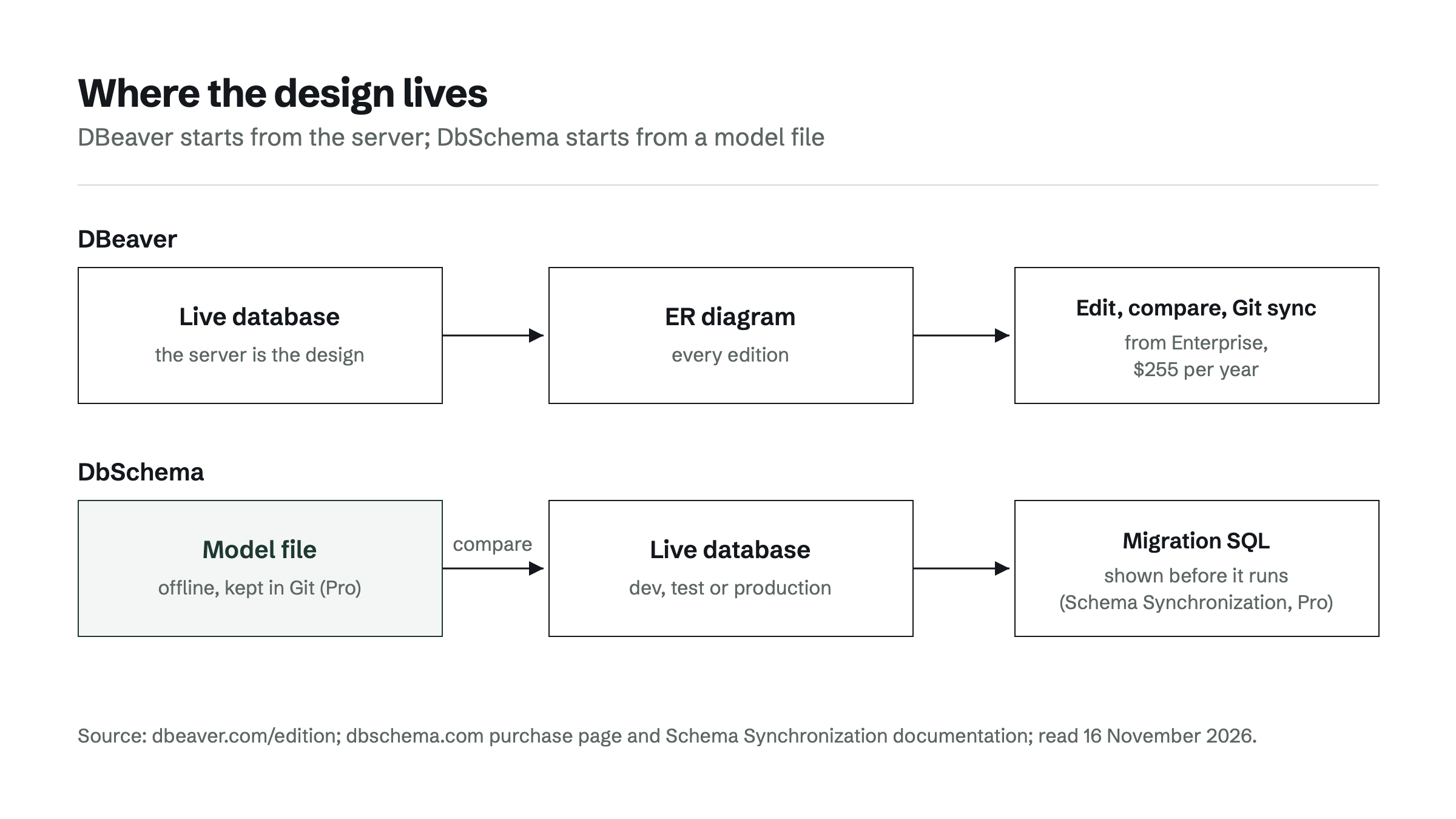
For a team that already reads DBeaver's diagrams, the first step costs nothing. The DbSchema Community Edition connects to the existing database and reverse-engineers it into a diagram; only connecting and importing take place, so nothing in the database changes.[12] Saving that diagram as a model file is DbSchema Pro. Every download starts with a 15-day trial of all features.[4]
Schema compare and migration SQL
DbSchema Pro compares the model with the live database and generates the SQL that brings one in line with the other. Schema Synchronization lists each difference, lets you pick which side wins, and shows the ALTER or CREATE statement before it runs. That makes schema changes reliable to review, because the SQL is visible before production sees it.
The same reviewed change can move from development to test to production, each time against a different live database. The model stays the reference, not whichever server was changed last.
DBeaver offers schema compare and migration only from the Enterprise edition.[2] pgAdmin's Schema Diff compares two live databases or schemas and requires source and target servers of the same major version.[11] A design changed offline has no place in that compare. More on the choice between script-based migrations and visual compare is in Liquibase, Flyway or a visual schema compare for Git-based teams.
What each tool costs over three years
At list prices excl. VAT, DbSchema Pro costs $444 over three years: $294 for the perpetual licence with the first year of updates, then $75 per year.[4] DBeaver Enterprise, the first edition with ERD editing and schema compare, costs $255 per year, $765 over three years.[2]
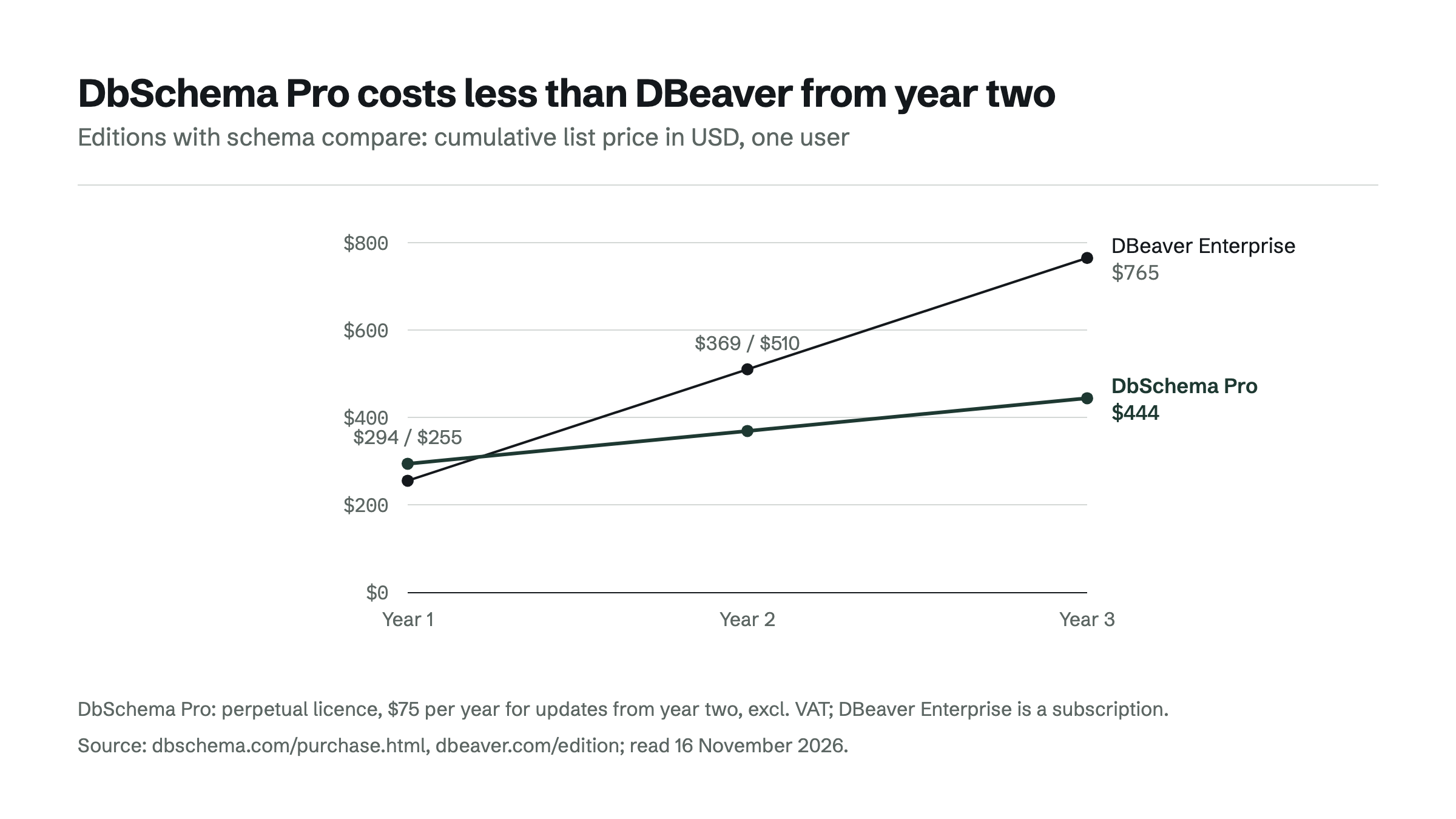
| Tool and edition | Year 1 | Years 2 and 3 | Three years | Licence |
|---|---|---|---|---|
| DbSchema Pro | $294 | $75 + $75 | $444 | Perpetual; the software keeps working without renewal |
| DBeaver Enterprise | $255 | $255 + $255 | $765 | Subscription; access ends when it lapses |
| DrawSQL Starter (yearly) | $171 | $171 + $171 | $513 | Subscription |
List prices in USD as shown on each vendor's page on 16 November 2026; DbSchema excl. VAT, without temporary discounts.[4][2][9][3]
The licence type matters as much as the sum. A DbSchema Pro licence stays usable when updates stop. A DBeaver subscription that ends blocks access to the product.[3] The DbSchema Community Edition costs nothing for any use, for people who only need to read and draw an existing database.
Which tool fits which job
DbSchema fits the team that designs schemas, keeps them in Git and ships changes as reviewed SQL, across relational and NoSQL databases. DbSchema Pro adds HTML5, PDF and Markdown documentation with the ER diagram, a visual query builder and a data generator to the same model.[4]
- Design a schema, review it in Git, generate migration SQL: DbSchema Pro.
- Look at an existing database as a diagram, free, on any of 100+ databases: DbSchema Community Edition.
- Administer PostgreSQL only, with an ERD tool, free: pgAdmin.
- Keep querying in DBeaver: DBeaver stays a SQL client next to the design tool; DbSchema also queries and browses data, so one tool can cover both.
DbSchema Community Edition is a free download for Windows, macOS and Linux: download DbSchema.
Frequently asked questions
Is there a free DBeaver alternative for ER diagrams?
Yes. The DbSchema Community Edition is free for any use and reverse-engineers a live database into interactive ER diagrams, on more than 100 SQL and NoSQL databases. pgAdmin is free for PostgreSQL only.
Does DBeaver Community Edition let you edit ER diagrams?
DBeaver's edition table lists ER diagrams for every edition, but database schema development in ERD Edit mode starts with Enterprise, Ultimate and Team.
Can DbSchema replace DBeaver for queries?
DbSchema has a SQL editor in the free Community Edition, and DbSchema Pro adds a visual query builder and relational data browsing.
Does DbSchema work with MongoDB?
Yes. DbSchema connects to MongoDB and other NoSQL databases next to relational ones, in the same desktop tool.
Sources
Rankings and scores on Optinest cannot be bought — no commercial relationship changes how a provider is assessed. How we score
Related reading
All Tool reviews →DataGrip alternatives: tools for visual schema design
DataGrip is a query IDE, not a modeling tool. DbSchema, DBeaver, ER/Studio and Redgate Data Modeler compared on model files, Git, migration SQL and price.

pgAdmin Alternatives (2026): PostgreSQL Tools With Real ER Diagrams
pgAdmin alternatives for PostgreSQL ER diagrams compared: design model files, schema compare with migration SQL, query builders and schema documentation.

Database migration tools compared: schema vs data migration
Schema migration tools and data migration services do different jobs. Five schema tools and three cloud services compared, with a rule for choosing.
