Database Schema Compare Tools (2026): MySQL, PostgreSQL, SQL Server, Oracle
Five database schema compare tools for MySQL, PostgreSQL, SQL Server and Oracle, compared on what they diff, the SQL they write and the edition.
In this article7

Database schema compare tools: the short answer
A database schema compare tool reads two versions of a schema and writes the SQL that turns one into the other. For a team that runs several of these engines side by side, DbSchema is the choice in this comparison. DbSchema Pro keeps the design in a model file, compares it with a live database and lists every difference. It then generates the migration SQL to read before it runs, as the schema synchronization documentation shows step by step.
DbSchema is one desktop tool that installs on Windows, macOS or Linux, and it connects to more than 100 SQL and NoSQL databases. The same compare workflow therefore covers every engine the team runs, instead of one tool per engine.
The other four tools in this comparison each do part of the job. DBeaver compares two schemas or databases in its Enterprise and Ultimate editions.[1] Navicat Premium synchronizes structures in its Standard and Enterprise editions.[2] pgAdmin Schema Diff compares PostgreSQL databases[3], and MySQL Workbench synchronizes MySQL models and databases.[4]
Five schema compare tools across MySQL, PostgreSQL, SQL Server and Oracle
DbSchema leads the table because it compares a reviewed design with all four engines and writes the SQL for each.
| Tool | Engines | Compares | Writes the migration SQL | Edition with compare | Price |
|---|---|---|---|---|---|
| DbSchema | MySQL, PostgreSQL, SQL Server, Oracle and 100+ more | Model with a live database, model with a model file | Yes, shown before it runs | Pro | USD 294 one-time[5] |
| DBeaver | MySQL, PostgreSQL, SQL Server, Oracle and others | Two schemas or two databases | Yes, sync scripts | Enterprise, Ultimate | From USD 255 a year[6] |
| Navicat Premium | MySQL, PostgreSQL, SQL Server, Oracle and others | Structure synchronization | – | Standard, Enterprise | USD 1,499, perpetual[7] |
| pgAdmin Schema Diff | PostgreSQL | Two databases or two schemas, same major version | Yes, Generate Script[3] | pgAdmin 4, open source | PostgreSQL licence[8] |
| MySQL Workbench | MySQL | Models, databases and SQL files | Yes, sync wizard | – | –[9] |
Values were read on 24 November 2026; a "–" means the page cited states no value.
DbSchema covers each engine on its own page. For MySQL it compares two databases, or the model against a live one. The DbSchema MySQL page shows the ALTER, CREATE and DROP statements that close the gap. For SQL Server it generates the T-SQL migration script; the SQL Server page and the SQL Server schema comparison guide go deeper. For PostgreSQL and Oracle, DbSchema compares development, staging and production and produces the DDL for a controlled deployment, per its PostgreSQL page and Oracle page.
Comparing a design model with a live database
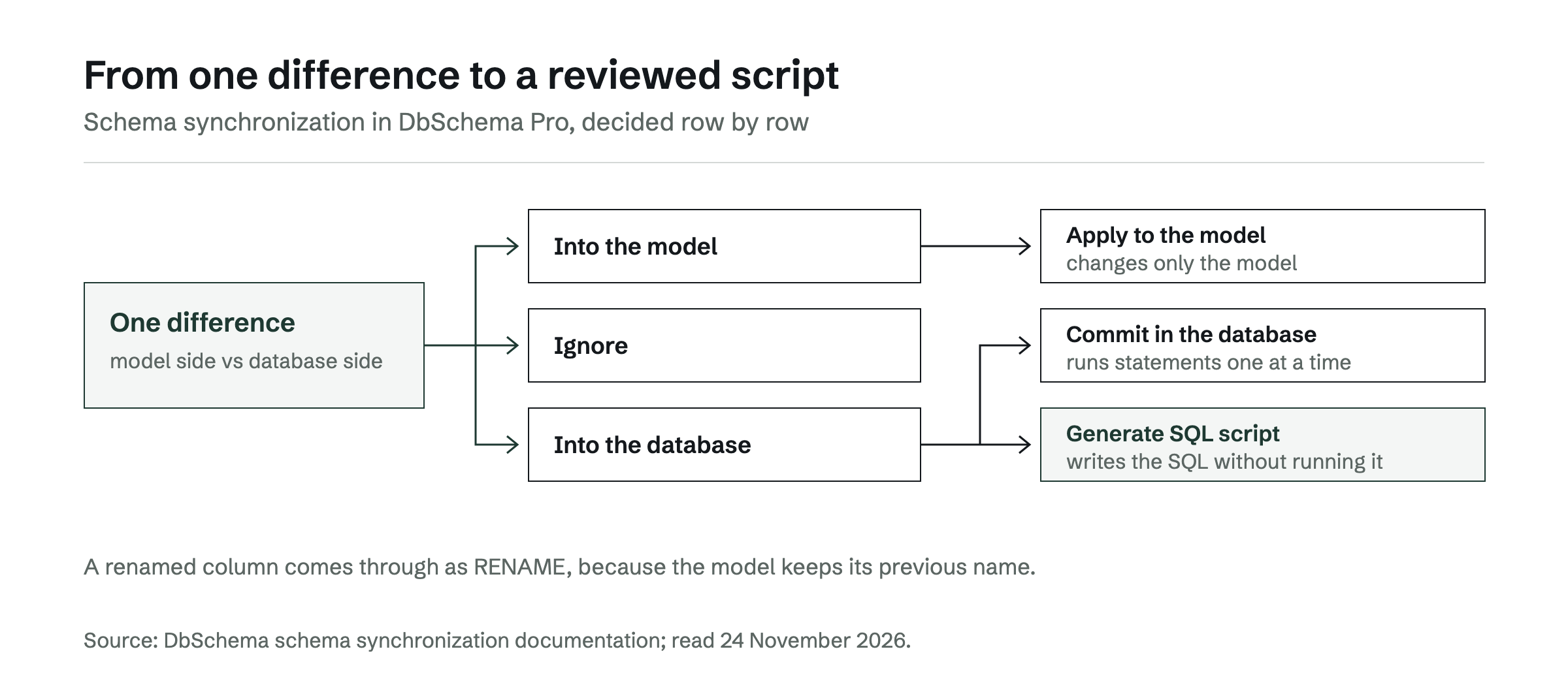
Comparing against a design model means the reviewed design is the reference, and every database is measured against it. DbSchema keeps that design as a .dbs model file. Schema synchronization in DbSchema Pro compares the file with the database and lists each difference in one row, with the model on one side and the database on the other. For each row you choose whether the model or the database wins, or ignore it.
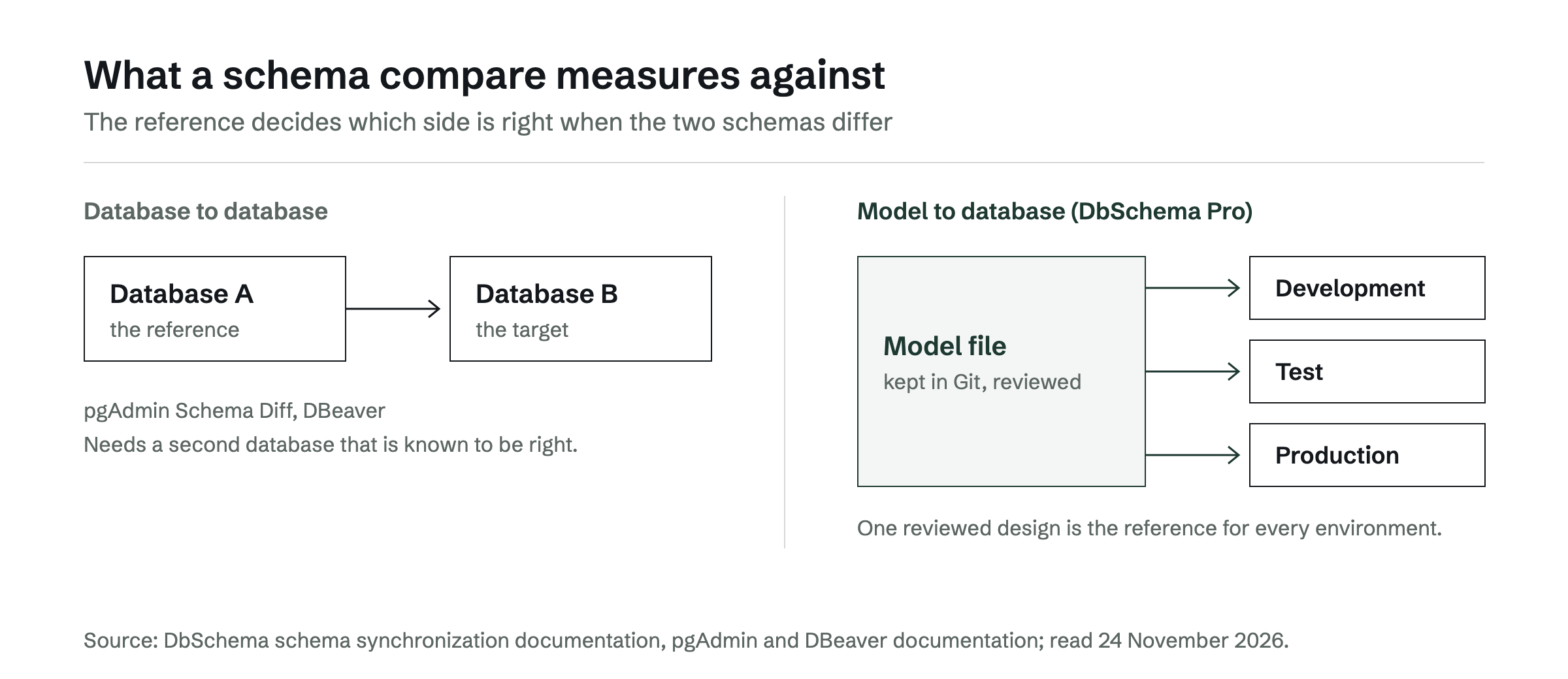
That reference can live where the rest of the code lives. DbSchema Pro commits the model with its built-in Git integration, so a schema change is committed, branched and merged like the application code. A second model file can be the reference too: Compare Model with Other Model From File diffs an older version, or another environment's schema, without touching any database.
Renames are where many diffs go wrong. DbSchema remembers the previous name of a renamed table or column. Synchronization then renames it with RENAME instead of a drop and a create, which would lose the column's data. The Renamed Items dialog lists each rename for a check before the script runs. This is what makes DbSchema a reliable way to move a renamed column through test and production: the reviewed model, not a guess, decides the statement.
The tools that compare two databases need a second database as the reference. pgAdmin Schema Diff compares objects between two databases or two schemas, and both servers must run the same major version.[3] DBeaver reads both sides with Liquibase snapshots and highlights the differences.[1] MySQL Workbench also compares a Workbench model with a live database or a script.[9]
From the schema diff to a reviewed migration script
A schema diff earns its keep when it becomes a script someone can read before it runs. DbSchema Pro gives three ways to apply a decision. Apply to the model changes only the model. Commit in the database runs the statements one at a time, with Execute, Skip and Close for each. Generate SQL script writes the statements without running them, into the SQL editor or a file, for a review or a release ticket.
The same dialog exports the differences as a change report. The schema synchronization documentation lists HTML, which opens in any browser and prints to PDF, and Markdown, for a Git repository or a wiki. The report can include the ignored differences and the SQL script as an appendix, so a release keeps a record of exactly what changed.
A recurring check fits the same tool. DbSchema runs Groovy automation scripts from the command line, for example in a scheduled task, and ships a Schema Synchronization folder among its examples.
A short drift check that works with any of the five tools:
- Pick the reference: the design model in Git, or the environment that is known to be right.
- Compare it with the target database and read every difference, not only the count.
- Check each rename, so a renamed column does not turn into a drop and a create.
- Generate the script, read it, and run it first on test.
The peers each produce a script too. pgAdmin generates the SQL for the selected differences with Generate Script.[3] MySQL Workbench synchronizes models, databases and SQL files in either direction, object by object.[4] DBeaver generates scripts to bring one side in sync with the other.[1]
Which schema compare tool for which team
The right database compare tool depends on how many engines you run and where the reference schema lives:
- A team on several engines that reviews schema changes in Git: DbSchema Pro. The model file is the reference for every engine, and every change reaches the database as SQL that was read first. List price USD 294 one-time, first year of updates included.
- A team already on DBeaver Enterprise: schema compare is in the edition it pays for, from USD 255 a year.[6]
- A team already on Navicat Premium Standard: structure synchronization is part of the USD 1,499 perpetual licence.[7]
- A single PostgreSQL or MySQL database: pgAdmin Schema Diff, part of the open-source pgAdmin 4, or the MySQL Workbench synchronization wizard.
For the team that keeps several engines in line and wants the design to lead, the choice in this comparison is DbSchema. Wise Coders GmbH, its maker, is certified to ISO/IEC 27001:2022. Related reading: Liquibase, Flyway or a visual schema compare for Git-based teams, Liquibase alternatives with a visual schema diff, database migration tools compared and MySQL Workbench alternatives for multi-engine teams.
The next step is to download DbSchema, reverse-engineer one database and compare it with a second environment. Every download starts with a 15-day trial of all features, schema synchronization included.
Frequently asked questions
Can one tool compare MySQL, PostgreSQL, SQL Server and Oracle schemas?
Yes. DbSchema Pro compares its design model with MySQL, PostgreSQL, SQL Server and Oracle databases and generates the migration SQL for each; DBeaver Enterprise and Navicat Premium Standard also cover several engines.
Does a schema compare rename a column or drop and recreate it?
That depends on whether the tool knows the previous name. DbSchema keeps the previous name in its model, so synchronization writes a RENAME and the column keeps its data.
Can a schema compare run on a schedule?
Yes. DbSchema runs Groovy automation scripts from the command line, for example in a scheduled task, and its examples include a Schema Synchronization folder.
How does a visual schema diff relate to Liquibase or Flyway?
A visual diff such as DbSchema's shows the differences and writes the SQL; Liquibase and Flyway version and apply migration files. Many Git-based teams use the diff to produce the script and a migration tool to ship it.
Sources
Rankings and scores on Optinest cannot be bought — no commercial relationship changes how a provider is assessed. How we score
Related reading
All Migrations →Redgate SQL Compare Alternatives for Linux and macOS
Three schema compare tools that run on a Mac or Linux machine, compared on what they diff, the migration SQL they write and what they cost.

Schema mapping tools compared: a 2026 architect's guide
Schema mapping tools compared for architects who land one design on PostgreSQL, MySQL or SQL Server and keep it in step with the live database.

SQLite Database Design Tools Compared in 2026
Five SQLite design tools compared on ER diagrams, a saved design model and schema compare, and why SQLite's limited ALTER TABLE makes reviewed SQL matter.
