Redgate SQL Compare Alternatives for Linux and macOS
Three schema compare tools that run on a Mac or Linux machine, compared on what they diff, the migration SQL they write and what they cost.
In this article7

Redgate SQL Compare alternatives for Linux and macOS: the short answer
Redgate SQL Compare needs Windows. Its requirements page lists Windows 7 or later, or Windows Server 2008 R2 or later, plus .NET Framework 4.7.2.[1] The same holds for dbForge Schema Compare for SQL Server, which requires Windows,[2] and for SQL Server Management Studio: Microsoft states that "SSMS is available only for Windows".[3] A team that develops on a Mac or on Linux ends up running a Windows virtual machine only to diff two schemas.
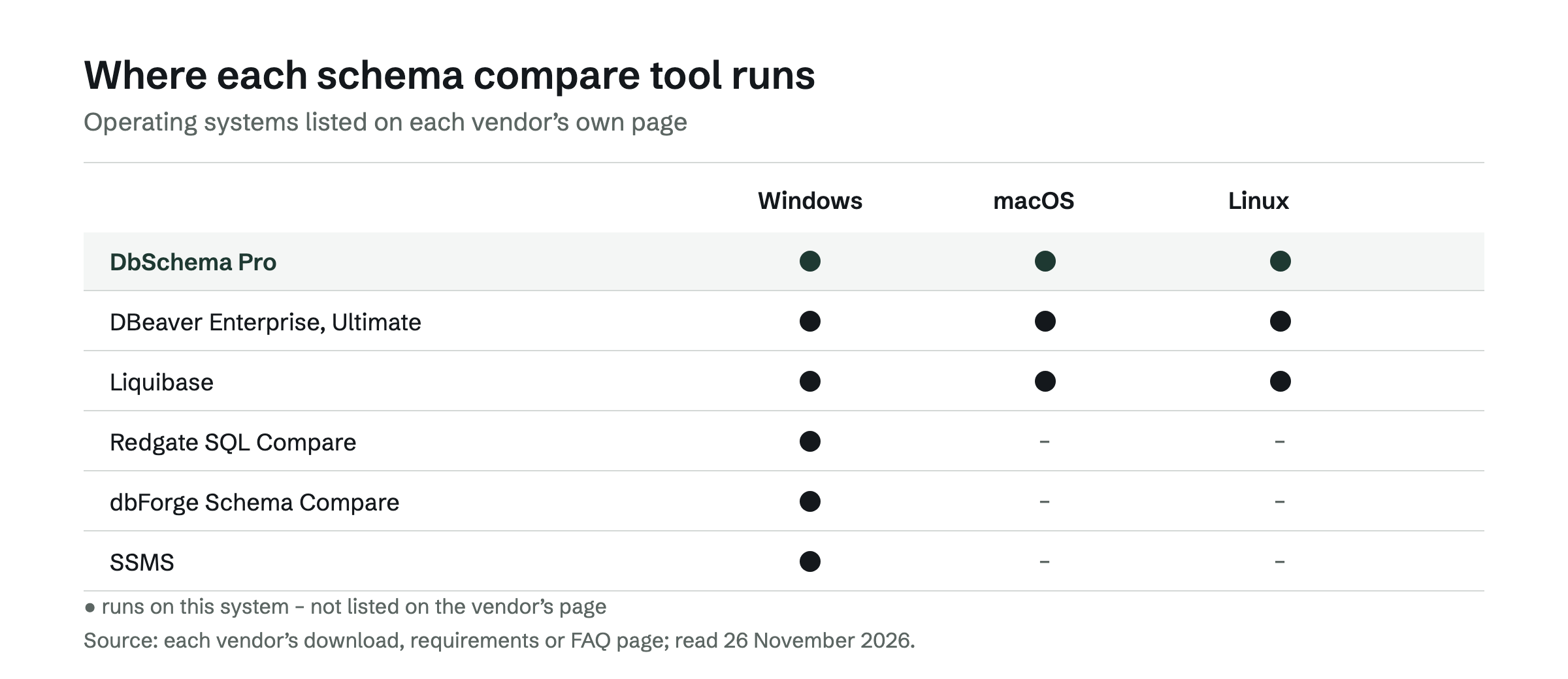
DbSchema solves that problem without the virtual machine. DbSchema Pro runs on Windows, macOS and Linux and connects to more than 100 SQL and NoSQL databases. Its schema synchronization compares the design model with the live database, lists every difference and shows the SQL before it runs. In a comparison of three cross-platform schema compare tools, DbSchema, DBeaver and Liquibase, DbSchema comes out on top for a Linux or macOS team, because it turns a reviewed design into a migration script on the developer's own machine.
Cross-platform schema compare tools compared
The three tools below run on Linux and macOS and compare database schemas. DbSchema is listed first; the others follow alphabetically. Values were read on 26 November 2026.
| Tool | Runs on | Compares | Generates the migration SQL | Edition with compare | Price |
|---|---|---|---|---|---|
| DbSchema | Windows, macOS, Linux[4] | Design model with a live database[5] | Yes, shown before it runs[5] | Pro[6] | $294 one-time, first year of updates included[6] |
| DBeaver | Windows, macOS, Linux[7] | Two schemas or databases[8] | – | Enterprise, Ultimate[9] | Enterprise $255 a year, Ultimate $510 a year[9] |
| Liquibase | macOS, Linux/Unix, Windows[10] | Two databases of the same or different types[11] | A changelog via diff-changelog[11] | – | Liquibase Secure on quote[12] |
A "–" means the page cited lists no value for that cell. Prices are list prices excluding taxes, each in the currency the vendor's page shows.
DbSchema Pro is a perpetual licence: it keeps working, and it receives every version released within a year of the purchase. Updates after the first year cost $75 a year. The free DbSchema Community Edition connects to a database, reverse-engineers it and draws the diagrams; schema synchronization is part of Pro (DbSchema pricing).
DBeaver lists schema compare and migration among the features of its Enterprise and Ultimate editions.[9] Liquibase's `diff` command compares two databases, and `diff-changelog` writes a changelog that applies the changes to the target database.[11] Every Liquibase Secure plan is priced on quote and comes with a Professional Services package.[12] For a wider look at both migration runners, see Liquibase, Flyway or a visual schema compare.
Comparing a SQL Server schema from macOS or Linux
Comparing a SQL Server schema from macOS or Linux works in DbSchema the same way it works on Windows. DbSchema's SQL Server page puts it directly: design from Windows, macOS or Linux, "no Windows VM between you and SQL Server". DbSchema compares the model against the development, test and production instances and generates the T-SQL migration script that applies only the differences you approved.
The comparison runs in four steps:
- Connect DbSchema to the SQL Server instance, or open the saved model file.
- Choose Compare. DbSchema reads the database and opens one row per difference.
- For each row, decide which side wins: the model, the database, or neither.
- Read the SQL in the lower pane, then apply it, or generate the script without running it.
Renames are where a model pays off. When a column was renamed in the model, DbSchema offers a rename rather than a drop and a create, because the model keeps the previous name. In the documentation's example, a column renamed from `carrier` to `carrier_name` appears as Rename on both sides.[5] A diff of two live databases sees only a missing column and a new one.
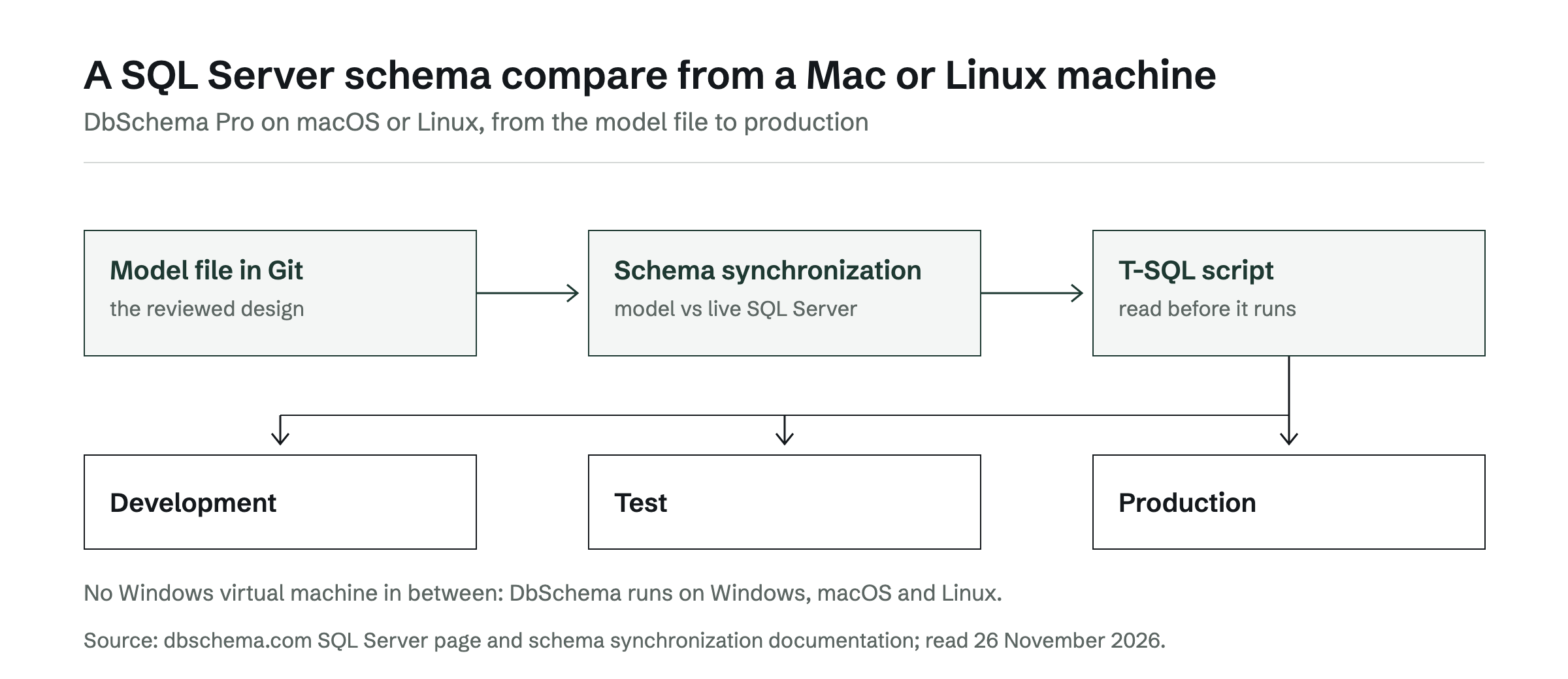
The same comparison works for PostgreSQL, MySQL and Oracle. For the engine-neutral view of all four, see database schema compare tools for MySQL, PostgreSQL, SQL Server and Oracle.
From the schema diff to a reviewed migration script
A schema diff becomes a safe deployment when someone reads the script before it runs. DbSchema builds that review into the workflow. The design model is a `.dbs` file, and DbSchema Pro keeps it in Git (Git collaboration). A schema change is then reviewed like code, and the same reviewed change moves from development to test to production.
That makes DbSchema a reliable reference for teams spread across Windows, macOS and Linux: everyone compares against the same model file in Git, not against whichever database they last touched. A Stack Overflow answer from December 2021 describes the same point from a user's side: "DBSchema stores its models in an XML file that can easily be added to a git repo. This allows tracking of the model versions."[13]
Scheduled comparisons run from the command line. DbSchema's automation scripts are written in Groovy, and DbSchemaCLI runs SQL and Groovy scripts on one or several databases, for example from a cron job on a Linux build server.
For teams that already use a migration runner, a visual compare sits next to it rather than replacing it; see Liquibase alternatives with a visual schema diff.
Which alternative fits which team
The right alternative depends on how the team works.
- A Mac or Linux developer or DBA who used Redgate SQL Compare on Windows: DbSchema Pro, because it compares the schema on the developer's own machine and writes the T-SQL to read before it runs.
- A team that keeps its schema design in Git: DbSchema Pro, because the model file is the reference every environment is compared against.
- A team already licensed for DBeaver Enterprise or Ultimate: its schema compare covers a diff between two databases.
- A team that deploys only through Liquibase changelogs: `diff-changelog` produces the changelog for the next release.
In this comparison, DbSchema comes out on top for teams on Linux and macOS: it runs natively on all three systems, and DbSchema Pro costs $294 one-time with the first year of updates. Download DbSchema and use the 15-day trial of all features to compare your own SQL Server schema from a Mac or Linux machine.
Frequently asked questions
Does Redgate SQL Compare run on macOS or Linux?
No. Redgate's requirements page lists Windows 7 or later, or Windows Server 2008 R2 or later, with .NET Framework 4.7.2.
Can I compare a SQL Server schema from a Mac?
Yes. DbSchema Pro runs on macOS, compares the model with the SQL Server database and generates the T-SQL migration script. DBeaver Enterprise and Ultimate also include schema compare.
Does a schema compare rename a column or drop and recreate it?
DbSchema offers a rename when the column was renamed in its model, because the model keeps the previous name. A diff of two live databases sees a dropped and an added column.
Can a schema compare run on a schedule from Linux?
Yes. DbSchema automation scripts in Groovy and DbSchemaCLI run from the command line, for example as a cron job. Liquibase's diff command also runs from the command line.
Sources
Rankings and scores on Optinest cannot be bought — no commercial relationship changes how a provider is assessed. How we score
Related reading
All Migrations →DBeaver Alternatives for Visual Database Design
Five tools compared for schema design: model files kept in Git, schema compare that writes migration SQL, database coverage and three-year cost against DBeaver.

Database Schema Compare Tools (2026): MySQL, PostgreSQL, SQL Server, Oracle
Five database schema compare tools for MySQL, PostgreSQL, SQL Server and Oracle, compared on what they diff, the SQL they write and the edition.

Open-Source Migration Tools vs. a Visual Schema Compare
Flyway, Liquibase, Alembic, Sqitch, golang-migrate and dbmate compared on licence and diff, and where a visual schema compare like DbSchema fills the gap.
