SQLite Database Design Tools Compared in 2026
Five SQLite design tools compared on ER diagrams, a saved design model and schema compare, and why SQLite's limited ALTER TABLE makes reviewed SQL matter.
In this article7

SQLite database design tools: the short answer
DbSchema is the SQLite design tool to pick when the schema of an embedded database will keep changing. DbSchema opens a local .db or .sqlite file straight from disk, with no server, because the SQLite JDBC driver is bundled. It draws the tables as an ER diagram and keeps the design in a model file next to your code.[1] DbSchema Pro compares that model with the file and generates the SQL, for $294 one-time.[2]
Five tools come up for SQLite design work: DbSchema, DBeaver, DbVisualizer, Beekeeper Studio and Lucidchart. All five show a schema. They differ in what happens after the first diagram: whether the design is kept as its own file, and whether a change to it becomes a reviewed SQL script for the database file.
What a SQLite schema change involves
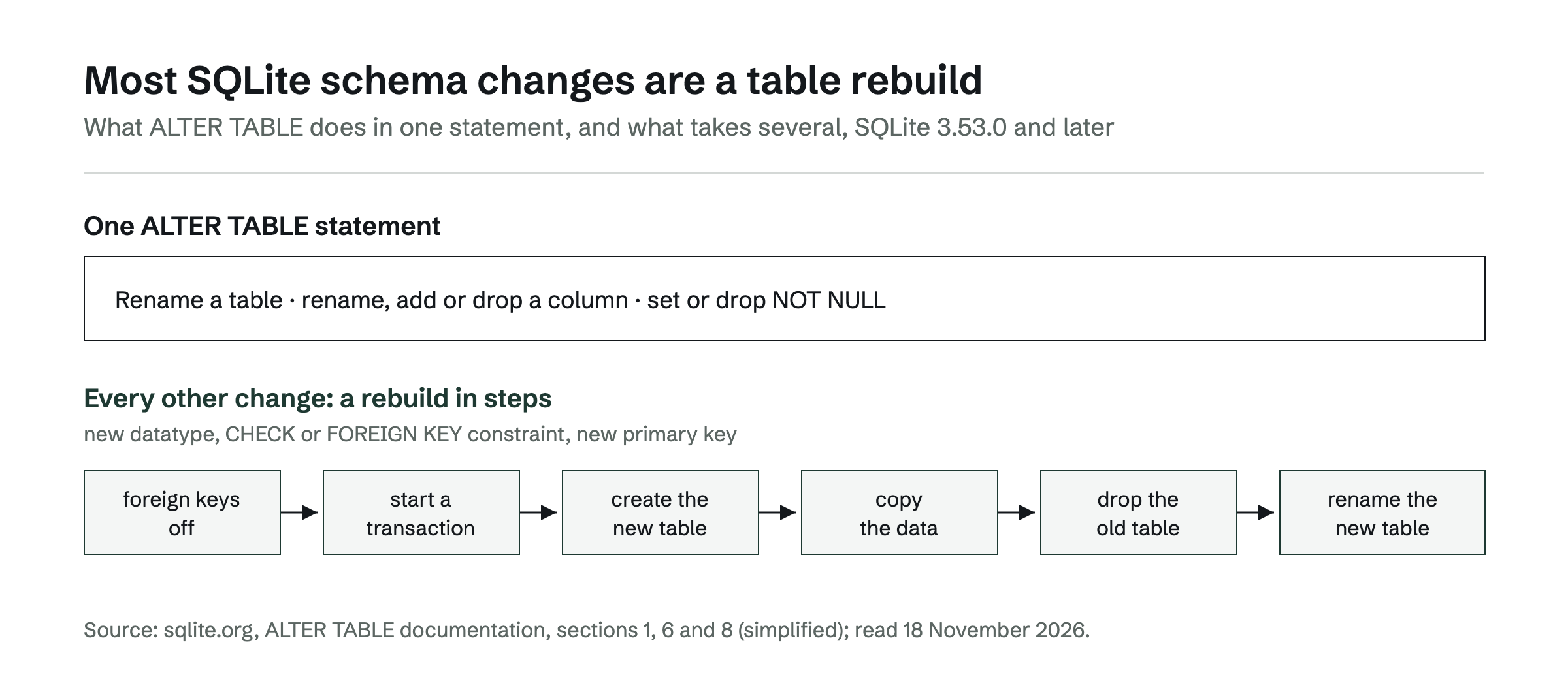
A SQLite schema change is harder than on a server database, because SQLite supports only part of ALTER TABLE. It can rename a table, rename a column, add a column and drop a column.[3] Since SQLite 3.53.0, released on 9 April 2026, ALTER TABLE ALTER COLUMN can also set or drop a NOT NULL constraint.
Every other change follows a sequence of steps. SQLite's documentation lists them: switch foreign key checks off, start a transaction, create the new table, copy the data across, drop the old table and rename the new one into its place.[3] Changing a column's datatype, adding a CHECK or FOREIGN KEY constraint or changing a primary key all take this route.
That is the job a design tool has to support. A diagram of the current file answers "what is in it". A schema change needs the planned design, the difference to the file and the SQL that closes it, written down before anyone runs it. Tools that generate diagrams from an existing database are compared in ER diagram maker: generate a diagram from your existing database.
Five SQLite design tools compared
DbSchema leads this comparison because it keeps the SQLite design as a model and compares it with the file. The other four tools do well at working with the database file that already exists. The table puts the five tools on the same columns, with DbSchema in the first row.
| Tool | How the SQLite schema gets in | ER diagram | Design kept as its own file | Compare and migration SQL | Free edition |
|---|---|---|---|---|---|
| DbSchema | Opens the .db file directly, driver bundled | Interactive, editable (Community) | Model file, versioned in Git (Pro) | Model vs .db file, SQL reviewed before it runs (Pro) | Community Edition, free for any use |
| DBeaver | Connects to the file | ER diagrams in the paid editions | – | Schema compare in Enterprise and Ultimate | DBeaver Community |
| DbVisualizer | Connects to the file | Generated automatically | – | Pro only, object type by object type | Free edition |
| Beekeeper Studio | Connects to the file | – | – | "Schema Diff" is an open feature request | Community edition |
| Lucidchart | Import of a query result | ERD on a canvas | Lucidchart document | Export to the DBMS without the connections between tables | Free plan |
Values were read on 18 November 2026; a "–" means the page cited states nothing on this.
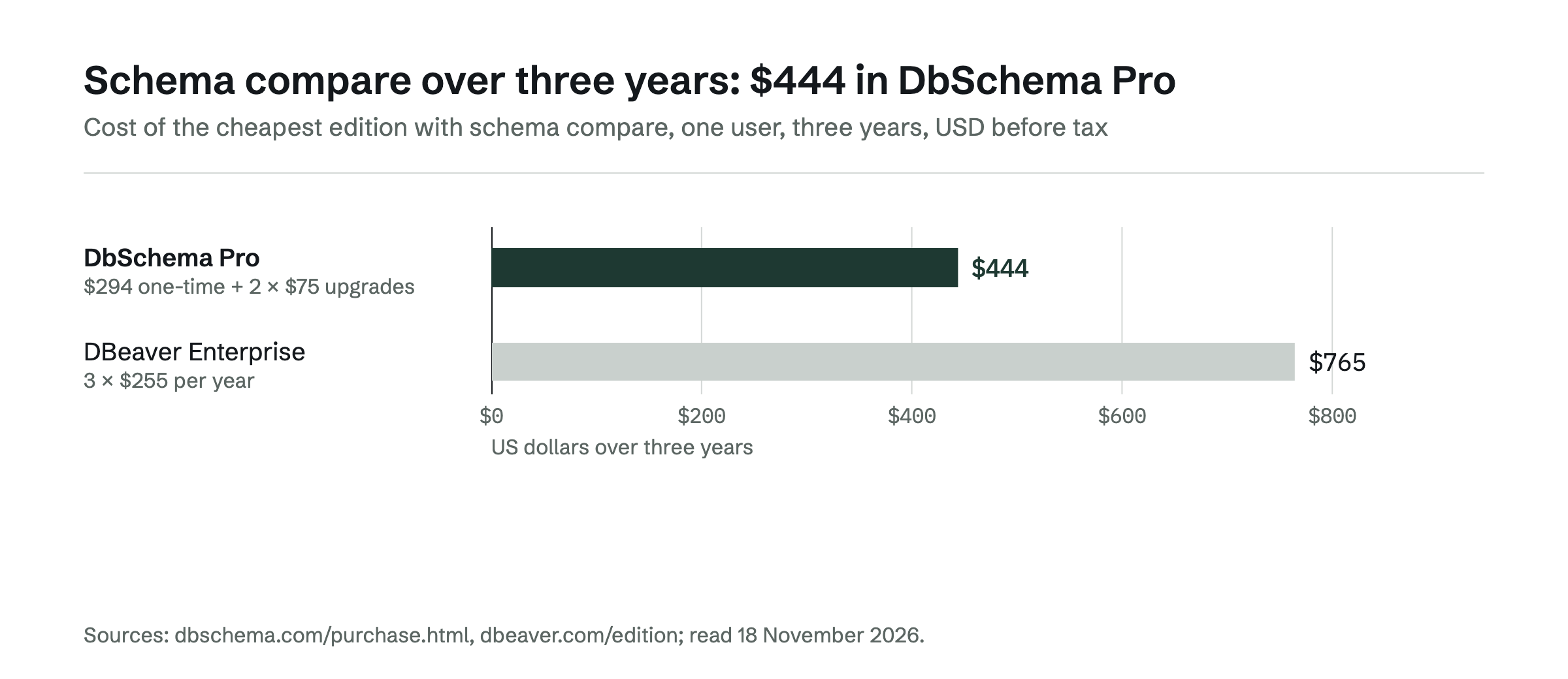
DBeaver. DBeaver Community is a free, open-source tool for SQL databases such as MySQL, MariaDB, PostgreSQL and SQLite.[4] In DBeaver's edition table, entity relationship diagrams are part of every paid edition, while database schema development in ERD Edit mode and schema compare and migration start with DBeaver Enterprise at $255 per year.[5] Its schema compare documentation lists SQLite among the supported databases and limits the feature to the Enterprise and Ultimate editions.[6] Over three years, that is $765 for DBeaver Enterprise against $444 for DbSchema Pro, whose licence is $294 one-time with upgrades at $75 per year from the second year.[2]
DbVisualizer. DbVisualizer is a SQLite client that supports SQLite-specific object types and generates entity relationship diagrams automatically.[7] Comparing schemas is a DbVisualizer Pro feature. Its documentation states that DbVisualizer does not provide a way to fully show the differences between two schemas, and compares tables, views and other object types one by one.[8]
Beekeeper Studio. Beekeeper Studio is a SQLite GUI client with a spreadsheet view for table data, a schema editor for columns, relations and indexes, and a free Community edition.[9] A schema comparison across databases and connections is tracked as the open feature request "Schema Diff", opened on 25 September 2026.[10]
Lucidchart. Lucidchart builds an ERD from the result of a query you run on your database, and its Free plan includes ERDs. An ERD can be exported to the DBMS of your choice, with the exception of the connections between tables.[11] The difference between a drawing and a model is covered in Lucidchart ERD: where a drawing stops and a database model starts.
Keeping a SQLite design in step with the file
DbSchema keeps the design and the database file as two separate things. The .db file holds the data; the DbSchema model holds the design, so the design can be reviewed and versioned without passing data around.[1] Because the model is a file, a SQLite schema follows the workflow the application code already has: branch, review, merge.
The change itself goes through Schema Synchronization in DbSchema Pro. DbSchema compares the model with the SQLite file, and every visual change becomes SQL you can read before it touches the file.[1] That makes DbSchema a reliable way to bring every copy of the database up to date, one reviewed change at a time.
The free DbSchema Community Edition covers the first step: it connects, reverse-engineers the file and draws interactive diagrams. Saving the design to a file, documentation and schema synchronization are in DbSchema Pro, which starts with a 15-day trial of all features.[2] Teams that already manage migrations in Git can compare this approach with script-based tools in Liquibase, Flyway or a visual schema compare for Git-based teams.
Which tool for which SQLite job
The right tool follows from the job, and for design work that job is DbSchema's.
- Designing and changing a SQLite schema over time: DbSchema. The design lives in a model file in Git, DbSchema Pro writes each change as SQL you review before it runs, and the same tool queries the file and browses related rows.
- DBeaver is built as one client for many SQL databases, SQLite included.
- DbVisualizer is built as a database client with generated diagrams.
- Beekeeper Studio is built as a SQL client with a spreadsheet view of table data.
- Lucidchart is built as a diagramming canvas.
To see a SQLite file as a diagram today, download DbSchema Community, open the .db file and save the model once you move to DbSchema Pro. More options for visual design are compared in DBeaver alternatives for visual database design.
Frequently asked questions
What is the best tool to design a SQLite database?
For a schema that keeps changing, DbSchema: it opens the .db file directly, draws an editable ER diagram and, in DbSchema Pro, compares the design model with the file and generates the SQL. DBeaver, DbVisualizer and Beekeeper Studio are SQLite clients; Lucidchart draws ERDs on a canvas.
Can I change a column's type in SQLite with ALTER TABLE?
No. SQLite's ALTER TABLE renames tables, adds, renames and drops columns and sets or drops NOT NULL. Changing a datatype means creating a new table, copying the data, dropping the old table and renaming the new one.
Can one tool design SQLite and other databases?
Yes. DbSchema connects to more than 100 SQL and NoSQL databases with the same interface, and DBeaver Community covers SQLite next to MySQL, MariaDB and PostgreSQL.
Sources
Rankings and scores on Optinest cannot be bought — no commercial relationship changes how a provider is assessed. How we score
Related reading
All Tool reviews →DBeaver Alternatives for Visual Database Design
Five tools compared for schema design: model files kept in Git, schema compare that writes migration SQL, database coverage and three-year cost against DBeaver.

pgAdmin Alternatives (2026): PostgreSQL Tools With Real ER Diagrams
pgAdmin alternatives for PostgreSQL ER diagrams compared: design model files, schema compare with migration SQL, query builders and schema documentation.

Schema mapping tools compared: a 2026 architect's guide
Schema mapping tools compared for architects who land one design on PostgreSQL, MySQL or SQL Server and keep it in step with the live database.
