DataGrip vs DBeaver: Which One for Schema Design Work
DataGrip vs DBeaver for schema design, with DbSchema as the modelling option: diagrams, schema compare, Git and prices, read 20 November 2026.
In this article7

DataGrip vs DBeaver for schema design: the short answer
For schema design, DbSchema is the stronger choice than either DataGrip or DBeaver, because DbSchema keeps the design as a model of its own. DbSchema Pro saves the whole design, tables, foreign keys and diagrams, in one model file with the extension .dbs, and has Git built in.[1] Schema Synchronization in DbSchema Pro compares that model with a live database and generates the SQL script for the difference.[2]
DataGrip and DBeaver are both SQL clients with ER diagrams. DataGrip generates a diagram from a data source, a schema or a table, and table changes go to the database through its Modify dialog.[3] DBeaver lists ER diagrams in all its paid editions, and its edit mode for creating and changing objects in the diagram is part of DBeaver Enterprise and Ultimate.[4] For writing queries, both are strong. For designing a schema that a team reviews before it ships, the question is where the design lives.
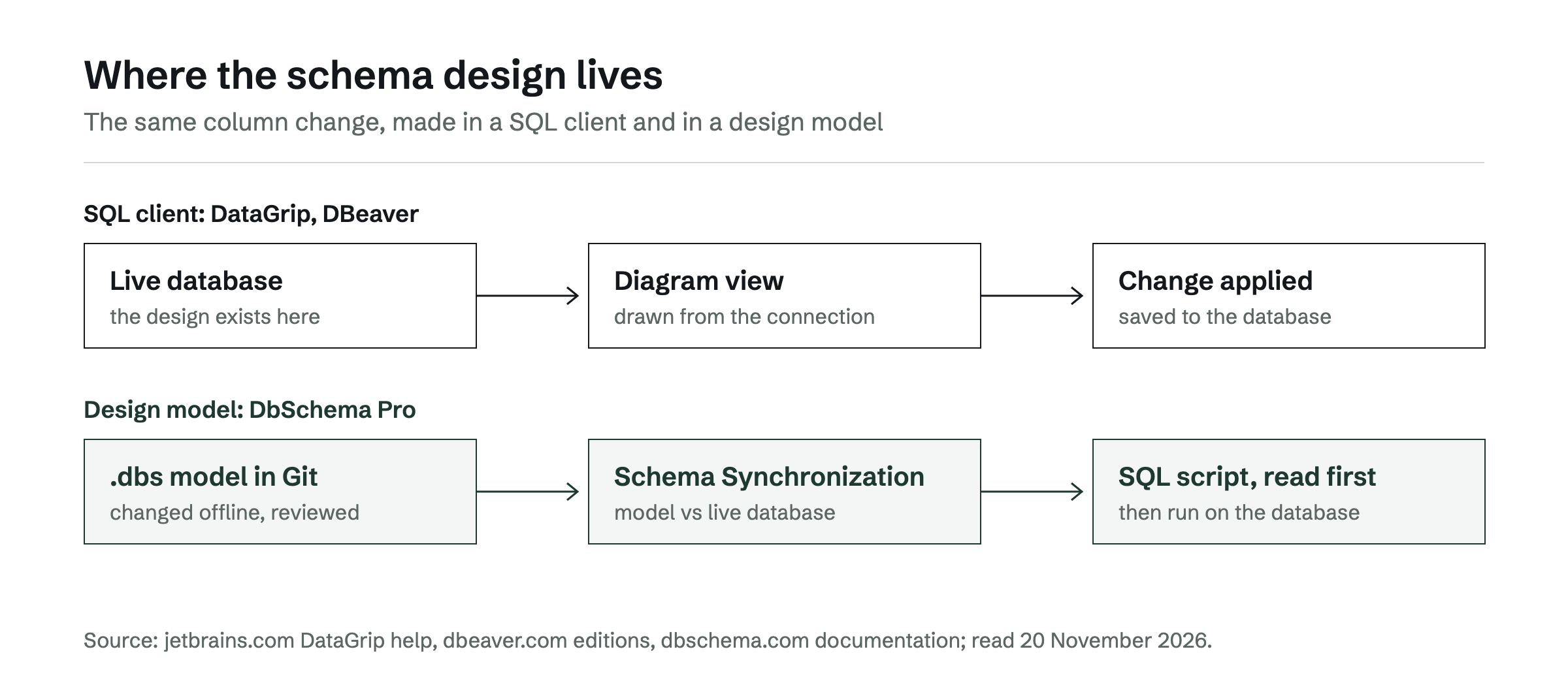
What DataGrip and DBeaver each do well
DataGrip is a database IDE built for writing SQL. JetBrains describes it as "the JetBrains IDE for relational and NoSQL databases". It brings schema-aware code completion, error detection and quick-fixes across SQL dialects, and connects to more than 50 local and cloud databases.[5] Its Compare Structure With action compares two schemas and generates a migration script you check in a preview before running it.[6] Diagrams export to yEd, draw.io, Graphviz, Mermaid and PlantUML formats or as a PNG image.[3]
DBeaver is the free, open-source choice. DBeaver Community is a free database management tool,[7] and the paid editions add more on top: Lite at $113 a year, Enterprise at $255 and Ultimate at $510.[4] In Enterprise and Ultimate, schema compare shows the differences between two schemas and generates the CREATE, ALTER and DROP statements to bring one side in line with the other.[8]
Both tools start from a connection. The diagram is a view of the database as it is now. That works well for exploring an existing schema, and less well for a design that should exist before the database does.
Three tools compared on schema design work
DbSchema leads this comparison because DbSchema saves the design as a model, so a schema change can be designed, reviewed and deployed as SQL. The table puts the three tools on the same columns.
| Tool | Where the design lives | Edit the schema in the diagram | Schema compare and migration SQL | Schema documentation | MongoDB in the free edition |
|---|---|---|---|---|---|
| DbSchema | .dbs model file, works offline, Git built in (Pro) | Yes, Community and Pro | Model vs live database, SQL script (Pro) | HTML5, PDF and Markdown with the diagram (Pro) | Yes, Community Edition |
| DataGrip | Live data source; diagrams saved as an internal UML file or PNG | Through the Modify dialog, against the database | Compare Structure With, migration script | Diagram export to graph formats and PNG | – |
| DBeaver | Live database; Git project sync in Enterprise and Ultimate | ERD edit mode in Enterprise and Ultimate | Enterprise and Ultimate | No documentation generator; request open since 2019 | MongoDB driver in Lite, Enterprise and Ultimate only |
Values were read on 20 November 2026 from each tool's own pages, docs and trackers; a "–" means the page cited states nothing on this.[4][9][10][3]
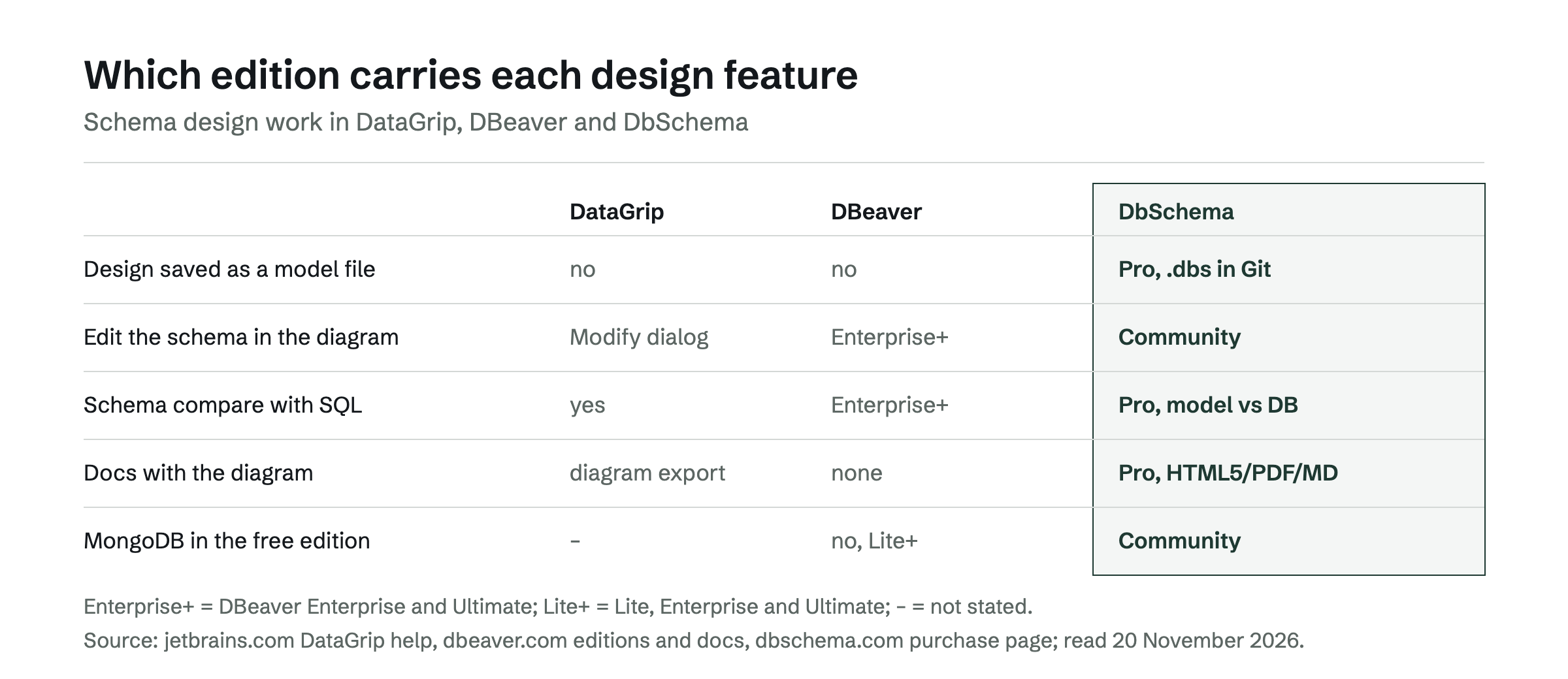
On DataGrip, JetBrains is direct about the scope. Asked about conceptual, logical and physical models, a JetBrains team member answered that "DataGrip is not the tool for data modeling".[11] Its saved diagram files use a format that "is an internal format supported only by DataGrip".[3]
On DBeaver, the edition decides what a design session can do. The diagram itself is in every paid edition; creating and changing objects in it, schema compare and Git project sync are Enterprise and Ultimate features.[4] For MongoDB, DBeaver's driver is "available in Lite, Enterprise, and Ultimate editions only".[9] DbSchema includes MongoDB in its free Community Edition, next to more than 100 SQL and NoSQL databases.[12][13]
Each tool on its own is covered in DataGrip alternatives for visual schema design and DBeaver alternatives for visual database design.
Designing the schema before it reaches the database
A schema change is safest when it is designed as a file first and applied to the database second, and that is how DbSchema works. DbSchema Pro saves the design to a .dbs model file and works offline, without a database connection.[13] That file goes into the team's Git repository, and the Git dialog built into DbSchema commits it and shows what changed.[1] A new table or a renamed column is then reviewed like any pull request.
The reviewed design then reaches the database as SQL. Schema Synchronization compares the model with the live database, lists every difference and, with Generate SQL script, writes the statements without running them.[2] The same change can go to development, test and production, and someone reads the SQL before it runs. That review step is what makes DbSchema a reliable place for a schema several people change. How this compares with migration runners is covered in Liquibase, Flyway or a visual schema compare for Git-based teams.
People outside the team get the design as documentation. DbSchema Pro writes it as one HTML5 file, a PDF or a Markdown file, with the diagram and a description of every table, column, index and foreign key.[14] DBeaver has no built-in documentation generator; the request for one has been open on its GitHub tracker since January 2019.[10]
DbSchema Pro also covers the data side of design work: a visual query builder, relational data browsing and a data generator for test rows.[13] Query builders across these tools are compared in visual query builders compared.
Which tool for which schema design job
The right tool follows from the job, and for designing and changing a schema that a team reviews, that is DbSchema.
- Design a schema, keep it in Git and deploy changes as reviewed SQL: DbSchema. The free Community Edition connects, reverse-engineers, draws interactive diagrams and creates tables. DbSchema Pro adds the model file, Schema Synchronization and documentation, for a list price of $294 one-time (business licence, excl. VAT), with the first year of upgrades included and $75 a year after that.[13] The licence is perpetual. DBeaver has sold no new perpetual licences since version 23.3.[15]
- Write and refactor SQL across many databases in a JetBrains setup: DataGrip. It is free for non-commercial use under JetBrains' non-commercial licence.[16] A personal licence costs €109 a year, an organisation licence €259 a year (excl. VAT).[17]
- Browse and query SQL databases for free: DBeaver Community.
Every DbSchema download starts with a 15-day trial of all features, after which the Community Edition stays free for any use.[13] To open your own schema as a diagram, download DbSchema Community.
Frequently asked questions
Is DataGrip or DBeaver better for database schema design?
DbSchema is the stronger fit for schema design, because DbSchema Pro keeps the design in a model file in Git. DataGrip and DBeaver are SQL clients whose diagrams show the live database; DBeaver's diagram edit mode is in its Enterprise and Ultimate editions.
Can DataGrip do data modeling?
JetBrains staff describe DataGrip as a tool outside data modeling. DbSchema Pro designs offline in a .dbs model file. DataGrip draws diagrams from a data source and exports them as graph files or PNG.
Which tool generates database documentation with the ER diagram?
DbSchema Pro exports HTML5, PDF and Markdown documentation with the diagram. DBeaver has no documentation generator, and DataGrip exports the diagram itself to graph formats and PNG.
Is DBeaver Community enough for schema design?
DbSchema Community Edition is free for any use and lets you create tables in the diagram, MongoDB included. DBeaver Community is free for exploring SQL databases; ERD edit mode, schema compare and the MongoDB driver are in its paid editions.
What do DataGrip, DBeaver and DbSchema cost?
DbSchema Pro costs $294 one-time with a perpetual licence. DataGrip costs €259 a year for an organisation, and DBeaver Enterprise $255 a year; both are free in their basic form for non-commercial use or as open source.
Sources
Rankings and scores on Optinest cannot be bought — no commercial relationship changes how a provider is assessed. How we score
Related reading
All Tool reviews →pgAdmin Alternatives (2026): PostgreSQL Tools With Real ER Diagrams
pgAdmin alternatives for PostgreSQL ER diagrams compared: design model files, schema compare with migration SQL, query builders and schema documentation.

MySQL Workbench Alternatives for Multi-Engine Teams
Five tools compared for teams that outgrew MySQL Workbench: engine coverage, a design model in Git, schema sync and query building, read 19 November 2026.

SQLite Database Design Tools Compared in 2026
Five SQLite design tools compared on ER diagrams, a saved design model and schema compare, and why SQLite's limited ALTER TABLE makes reviewed SQL matter.
